4/18/2026
React Native for Mobile App Development: Pros, Cons, Fit
React Native for mobile app development: learn the real pros, cons, and a fit checklist to decide when it beats native and when it’s risky.

React Native is often pitched as the “best of both worlds” for iOS and Android: one codebase, near-native UI, and faster iteration. In practice, it can be exactly that, or it can become a slow-moving dependency puzzle that forces your team into constant framework upgrades and platform edge cases.
This guide is built for founders and product leads making a 2026-era decision. You will get a clear view of the real pros, the real cons, and a practical way to decide whether React Native is a fit for your specific app.
What React Native actually is (and why that matters)
React Native lets you build mobile apps using JavaScript or TypeScript with React, while rendering real native UI components under the hood. It is not “a mobile website in a wrapper.” Your app runs in a native container, talks to native APIs through a bridging layer (increasingly via newer interop mechanisms), and ships through the App Store and Google Play like any other mobile app.
Why this matters: most of React Native’s trade-offs are not about “can it build an app,” but about how much native surface area your product needs (hardware, OS-level features, performance-critical UI) and how much you value shared development velocity across platforms.
If you want to go deeper on implementation quality after you decide, Appzay’s companion guide on React Native app development best practices for 2026 covers architecture and release engineering.
React Native pros (when teams get the benefits)
React Native’s advantages show up when your product roadmap rewards fast iteration and consistent cross-platform delivery.
Faster time-to-market with a single product team
For many startups, the biggest win is organizational: one feature team can ship to iOS and Android without doubling headcount. That tends to reduce coordination overhead and makes it easier to keep feature parity.
Shared UI and business logic, with native escape hatches
You can share large parts of:
- Product logic (networking, state, validation)
- UI patterns (design system components)
- Analytics and experimentation plumbing
And when you hit a platform-specific need, you can still implement native modules and expose them to your React Native layer.
Strong talent pool and ecosystem
React and TypeScript skills are widely available, and many teams already use them on the web. That typically shortens hiring time and makes it easier to maintain consistent engineering standards across product surfaces.
Great fit for “product UI” apps
React Native is particularly strong for apps that are primarily:
- Navigation-heavy
- Form-heavy
- Feed and content-heavy
- Marketplace or workflow-driven
In these apps, perceived quality is often driven more by responsiveness, polish, and UX consistency than by GPU-heavy rendering.
Mature tooling for shipping like a serious mobile org
React Native can support professional-grade delivery practices, including automated builds, testing, staged rollouts, and observability. The framework choice is rarely the blocker, the delivery discipline is.
React Native cons (the costs teams underestimate)
React Native works best when you plan for its constraints upfront. The failure mode is usually not “React Native can’t do it,” but “we did not budget for the native edges.”
Native complexity does not disappear
You still have:
- iOS and Android release processes
- Platform policies and review requirements
- OS updates that can break assumptions
- Native dependency management (especially for modules)
React Native reduces duplication, but it does not remove the need for mobile expertise.
Performance is usually good, but not uniformly good
Most screens can be smooth if built well. The problems show up in hotspots:
- Heavy gesture and animation interactions
- Very large lists with complex item layouts
- Real-time media pipelines (camera, audio processing)
- CPU-intensive work on the main UI thread
You can absolutely ship a fast React Native app, but you need performance budgeting, profiling, and occasional native optimization.
Framework and library churn is real
React Native evolves quickly, and your dependency graph matters. A single unmaintained library can block upgrades or force a costly replacement.
This is especially important if you plan to run a long-lived product with strict compliance, security, or OS support targets.
“One codebase” can create product compromise
Cross-platform is a spectrum. If you push too hard for identical behavior everywhere, you may miss platform expectations (navigation patterns, input behavior, accessibility conventions). If you diverge too much, you can end up with two apps hiding inside one repo.
The goal is not maximum shared code, it is maximum outcome per engineering hour.
React Native fit: where it shines (and where it usually does not)
A useful way to decide is to map your app to the type of work it does most days.
| App characteristics | React Native fit | Why |
|---|---|---|
| MVP for a funded startup with fast iteration needs | Strong fit | Shared velocity, faster roadmap learning, easier parity across iOS and Android |
| Content, feeds, education, reading, dashboards | Strong fit | UI patterns are well-supported, performance is typically manageable |
| Marketplace, booking, B2B workflow, internal tools | Strong fit | High product leverage from shared logic and consistent UX |
| Apps with frequent UI experiments and A/B tests | Good fit | React-style componentization supports rapid iteration |
| Heavy real-time camera processing, AR, advanced graphics | Weak fit | Often needs deep native optimization and specialized rendering pipelines |
| High-fidelity games or physics-driven animation | Weak fit | Game engines and native render loops are usually a better match |
| “Day 1 OS feature adoption” (new OS APIs immediately) | Mixed | Possible, but you may wait for ecosystem support or build native bridges yourself |
A simple fit scorecard you can use in a kickoff
This is not a strict formula, but it helps teams align quickly.
| Decision factor | Green for React Native | Yellow | Red for React Native |
|---|---|---|---|
| UI complexity | Standard product UI, lists, forms | Some custom interactions | Constant 60 to 120 fps custom animation and rendering |
| Native feature depth | Push, auth, payments, maps | A few custom device features | Deep camera, audio, Bluetooth, AR, background services |
| Roadmap pressure | Weekly iteration and experimentation | Monthly releases | Long cycles, high regulatory overhead |
| Team composition | Strong TypeScript and product engineering | Mixed | No mobile experience and no plan to add it |
| Longevity | 1 to 3 year horizon, planned maintenance | 3 to 5 years | Very long-lived app with strict OS support and minimal churn tolerance |
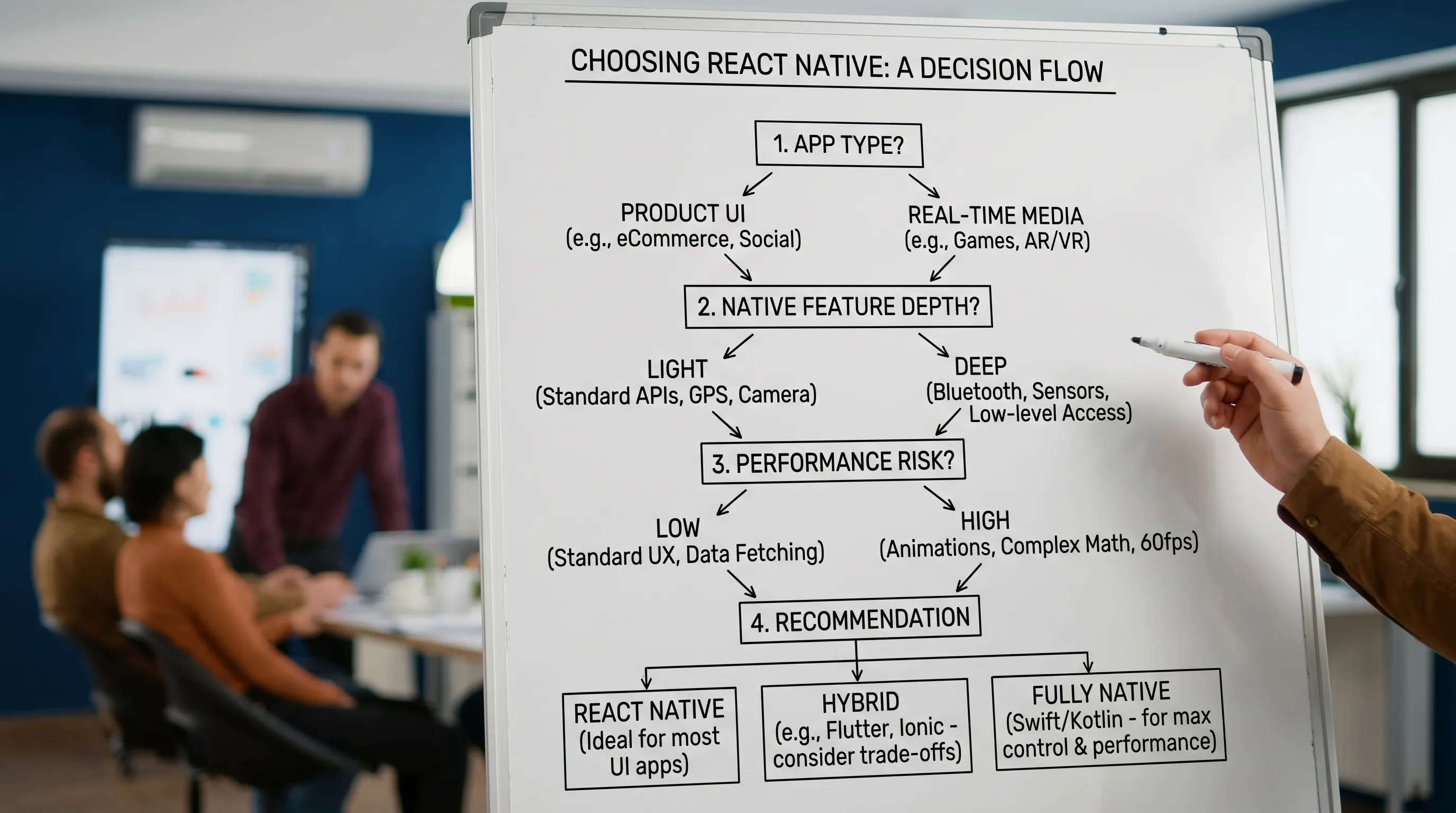
The “gotchas” that decide React Native success
If you want a realistic answer, you need to evaluate these areas early, before you commit.
1) Your native boundary surface
List every feature that touches platform-specific capabilities: authentication methods, camera modes, Bluetooth devices, background tasks, file system access, widgets, share sheets, and so on.
The bigger the native boundary surface, the more you should assume ongoing native work, not just a one-time integration.
2) Your quality bar and performance budget
React Native can hit a premium feel, but only if you define what “premium” means:
- Startup time targets
- Screen transition smoothness
- Scroll performance on mid-tier Android devices
- Crash-free sessions and ANR thresholds
If your app wins on “it feels instant,” you should treat performance work as a first-class deliverable, not polish.
3) Release engineering maturity
Many React Native projects fail because releases are painful. The app becomes hard to upgrade, QA becomes manual, and shipping slows down.
Even if you are a small team, you want the basics: reliable CI builds, repeatable signing, environment configuration, automated tests where they pay off, and staged releases.
4) Store policy and compliance constraints
React Native apps still live under the same constraints as any mobile app: privacy disclosures, permission prompts, payment rules, and review expectations.
If you are building in a regulated area, plan early for the proof you will need during review and audits. Appzay’s App Store app requirements guide can help you anticipate common blockers.
React Native vs native: the business trade-off (not the ideology)
A more honest comparison is not “React Native vs native,” it is “shared execution vs platform specialization.”
| Dimension | React Native | Native iOS + Android |
|---|---|---|
| Initial build speed | Often faster for one team | Often slower, two codebases |
| Feature parity | Easier to maintain | Requires coordination |
| Peak performance ceiling | High, but with hotspots | Highest, most direct control |
| Access to new OS APIs | Sometimes delayed | Immediate |
| Hiring and staffing | Broad React/TS pool | More specialized mobile pool |
| Long-term maintenance | Can be efficient if disciplined | Predictable, but duplicated work |
If you already suspect your app will need deep native specialization, Appzay’s guide on when native mobile development beats cross-platform can help you pressure-test that assumption.
Real-world examples of “fit” (so you can map your product)
- A micro-learning app with offline reading, bookmarks, and smooth navigation is typically a strong React Native candidate because most complexity is product UX and content orchestration.
- A team building a mobile experience for sales enablement or customer support coaching can often move fast with React Native, especially when the product is UI-first and iterates quickly. For instance, an AI roleplay training platform may prioritize rapid iteration on scenarios, feedback flows, and analytics views, all areas where cross-platform speed can be a competitive advantage.
- A computer-vision-heavy fitness app that does real-time pose estimation on-device can still use React Native, but it commonly becomes a hybrid architecture where the performance-critical loop is native.
How to validate React Native quickly (without committing too early)
If the decision is close, do a short technical spike that answers the only question that matters: “Can we hit our quality bar with acceptable risk?”
A good spike is built around one or two “hard screens,” not a generic hello-world:
- Your most complex interaction (gesture + animation)
- Your heaviest list screen (real data, real item complexity)
- Your riskiest native integration (camera, audio, BLE)
Success criteria should include measurable outcomes: frame stability, memory behavior, cold start time, and implementation complexity.
Frequently Asked Questions
Is React Native good for mobile app development in 2026? Yes, for many product UI apps it is a strong choice in 2026, especially when you value shared delivery across iOS and Android. The key is validating native features and performance hotspots early.
What types of apps should avoid React Native? Apps that depend on real-time media pipelines, advanced graphics, AR, or highly specialized background behavior often benefit from native or a hybrid architecture, because the performance ceiling and OS-level control are higher.
Will React Native save money compared to two native apps? It can, but only if you invest in good architecture, dependency hygiene, and release engineering. If upgrades and native module work are neglected, maintenance costs can erase the initial savings.
Can React Native feel truly “native” to users? Yes, React Native renders native components, and with a strong design system and platform-aware UX decisions it can feel premium. The biggest risks are performance hotspots and forcing identical UX where platforms expect differences.
Build the right architecture, then ship it end-to-end
If you are deciding between React Native, native, or a hybrid approach, Appzay can help you assess fit based on your roadmap, quality bar, and technical risk, then design, build, and launch the app end-to-end. Start with a short discovery and technical spike so your team commits with evidence, not guesswork.
Explore Appzay’s approach to end-to-end mobile app development or reach out at Appzay.com to discuss your product.