4/12/2026
Native Mobile App Development: When It Beats Cross-Platform
Learn when native mobile app development beats cross-platform with a clear framework on performance, UX, device features, and long-term maintenance.

If you are deciding between native and cross-platform, you are usually optimizing for one of two things: speed to a credible V1, or the highest-quality product experience with the least long-term friction. Cross-platform can be a great accelerator, but there are clear situations where native mobile app development wins on performance, platform fit, and maintainability.
This guide is written for funded startup teams and product leaders who want a practical, non-religious answer to: when does native beat cross-platform, and why?
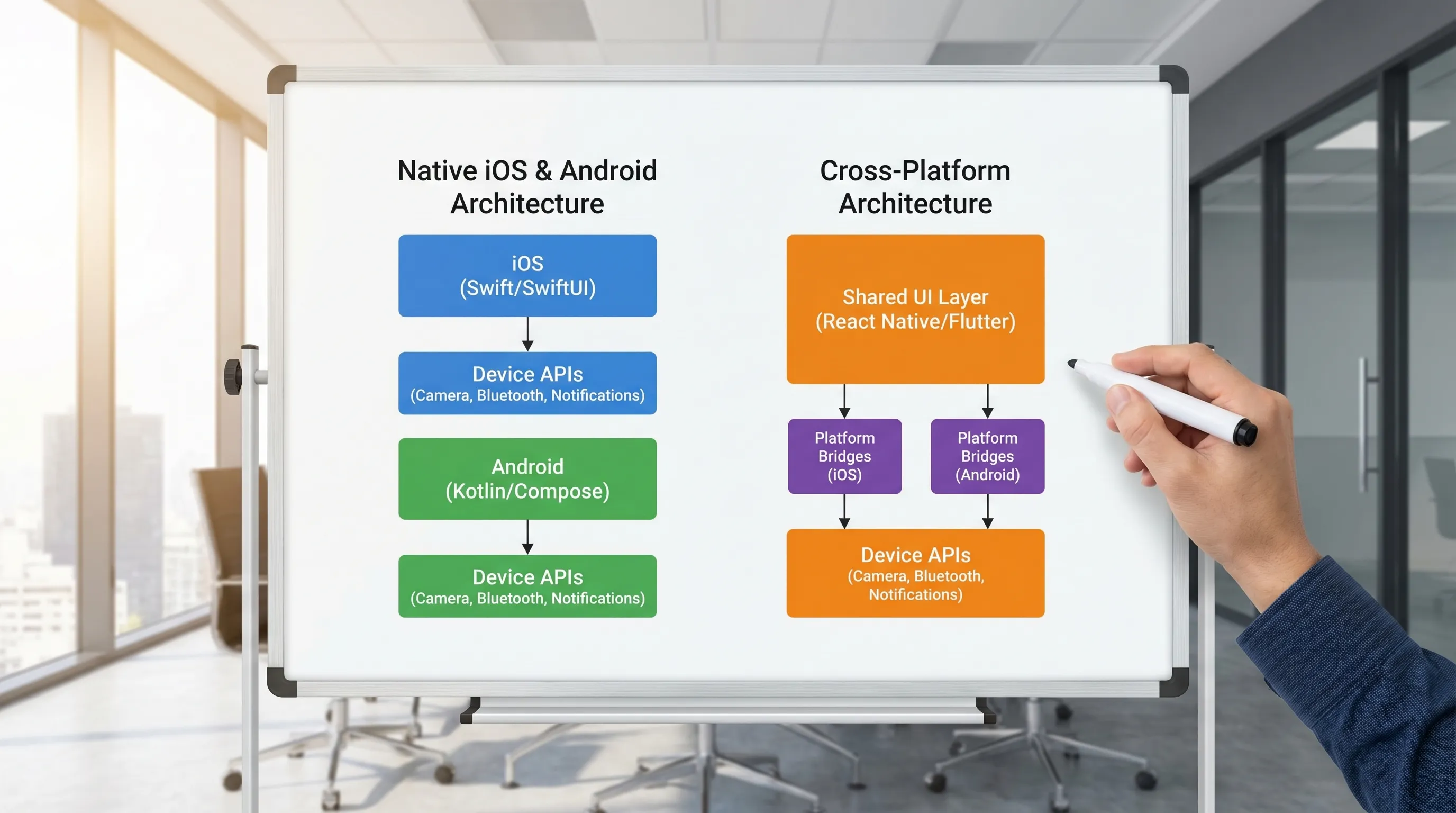
Native vs cross-platform: the real difference (beyond the tech stack)
“Native” usually means:
- iOS app written in Swift (often SwiftUI) and/or Objective-C
- Android app written in Kotlin (often Jetpack Compose) and/or Java
“Cross-platform” typically means:
- A shared UI and business-logic layer (for example React Native, Flutter)
- Platform bridges for device features
In practice, the biggest difference is not language. It is how directly you can use the platform:
- Native uses Apple and Google APIs as they are designed, on day one.
- Cross-platform depends on a framework’s abstractions and its plugin ecosystem, and it often requires custom native work at the edges.
That “edge work” is where teams lose time, quality, or both.
A founder-friendly decision framework
Before you compare frameworks, answer two questions:
-
Will your product’s success depend on platform-level experience? (speed, smoothness, camera, audio, offline reliability, system UI polish)
-
Will your roadmap regularly touch new OS capabilities? (new privacy rules, background execution changes, wearable integrations, on-device ML, widgets, Live Activities)
If the answer is “yes” to either, native becomes the lower-risk choice surprisingly often.
Quick comparison table
| Decision factor | Native mobile app development | Cross-platform |
|---|---|---|
| UI performance and smoothness | Best possible, fewer abstraction layers | Often great, but more sensitive to complex animations and heavy UI trees |
| Access to new iOS/Android APIs | Immediate | Usually delayed until framework/plugins update, or you build custom bridges |
| Advanced device features (camera, BLE, audio) | Most predictable | Often requires native modules and careful maintenance |
| Hiring and team structure | Two platform skill sets | One main stack, plus some native skills for edge cases |
| Long-term platform maintenance | Straight-line with OS changes | Depends on framework upgrades, plugin health, and bridge compatibility |
| Time to first MVP (simple scope) | Can be fast with strong native team | Often fastest for basic apps, especially with one shared codebase |
When native mobile app development beats cross-platform
1) Your app is “performance-native” by nature
Some products win or lose on perceived speed and responsiveness. Native is hard to beat when your app needs:
- High frame-rate interactions (gesture-heavy UI, complex animations)
- Large local datasets with fast search and filtering
- Offline-first behavior with robust background sync
- Low-latency experiences (real-time collaboration, streaming, or audio)
Cross-platform can absolutely be performant, but the margin for error is smaller, and diagnosing performance issues can be harder when you have multiple rendering layers.
If your product’s differentiation is “it feels instant,” native is the safer bet.
2) Your roadmap leans on camera, media, sensors, or “hardware-adjacent” features
Native tends to win for apps that depend on:
- Camera pipelines (manual controls, fast capture, on-device processing)
- Audio recording and playback (background, interruptions, Bluetooth routing)
- Bluetooth Low Energy (BLE) devices
- AR experiences, motion sensors, health data, wearables
These surfaces are where cross-platform projects commonly end up writing significant native code anyway.
A good mental model is this: if you expect to spend a lot of time in Apple and Google’s docs (for example Apple Developer Documentation and Android Developers), you are already living in native territory.
3) Platform UX details matter to adoption (and retention)
Startups often underestimate how much App Store and Play Store outcomes depend on polish: perceived quality, UI consistency, accessibility, and small interaction details.
Native makes it easier to:
- Match each platform’s conventions (navigation, gestures, controls)
- Adopt new OS UI patterns sooner
- Implement accessibility correctly (VoiceOver, Dynamic Type, TalkBack)
This matters most in competitive categories where users compare you directly to incumbents.
4) You need OS features early, not “eventually”
When Apple or Google introduces new OS behaviors, startups sometimes have a short window to benefit (or to avoid disruption). Examples include privacy prompts, background restrictions, new notification behaviors, widgets, and live surfaces.
Native reduces dependency risk:
- You can implement changes as soon as the OS and SDKs allow it.
- You are less exposed to third-party plugin abandonment.
If your team cannot afford to wait for a framework update or community-maintained plugin, native is the more controllable path.
5) Your product has complex state, reliability requirements, or regulated data
As soon as you care deeply about correctness, deterministic behavior, and observability, native becomes attractive because you can align tightly with platform tooling:
- Crash diagnostics, profiling, and energy usage tools
- Background task scheduling and constraints
- Fine-grained permission handling
This is not about “cross-platform is unsafe.” It is about reducing moving parts when reliability is the product.
When cross-platform is the better business decision
Native is not always the right call. Cross-platform can be the best option when:
- The app is primarily standard screens (forms, lists, content)
- You need to validate a market quickly with limited engineering budget
- Feature parity across iOS and Android matters more than platform-specific UX
- Your team already has deep expertise in a cross-platform ecosystem
A common winning approach for startups is: cross-platform for a narrow, validated V1, then native later if the product proves demand and the roadmap becomes platform-heavy.
The catch is you should plan for that possibility early, especially in how you structure APIs, data models, and app architecture.
The hidden costs to compare (that most estimates miss)
A fair comparison is not “native takes 2x time because there are two apps.” That is sometimes true, but often incomplete.
Cost driver 1: the “last 20 percent” of quality
Cross-platform can get you to a working app quickly, but teams often spend disproportionate time on:
- Platform-specific UI inconsistencies
- Edge-case bugs tied to OS versions and devices
- Build and release issues involving native toolchains
If you are pitching enterprise buyers, or your reviews will make or break growth, that last 20 percent matters.
Cost driver 2: bridge maintenance over time
Most cross-platform apps eventually rely on custom native modules for critical features. Those modules are not “write once.” They must be maintained as:
- iOS and Android APIs evolve
- The cross-platform framework changes its internals
- Build systems and dependency managers change
If your roadmap depends on several native integrations, it can be cheaper long-term to embrace native earlier.
Cost driver 3: release operations and store compliance
Regardless of stack, you still need excellent release hygiene: CI/CD, signing, build reproducibility, privacy disclosures, and store requirements.
If you want a practical checklist for iOS, this guide is useful: App Store Submission Checklist: Avoid Rejections Fast.
A pragmatic hybrid strategy that often wins
Many successful teams do not treat this as a binary choice. Common hybrid approaches include:
- Native apps with shared backend-driven logic: Keep the mobile code platform-native, share business rules on the server.
- Native shells with shared modules: Share only what is stable (for example a core SDK, data models, or encryption utilities).
- Cross-platform core, native “power features”: Build camera, BLE, media, or high-performance screens natively where it matters.
The key is to decide early where you want coupling. Coupling to a cross-platform UI layer is a bigger bet than sharing non-UI code.
How to decide in 30 minutes: a scoring worksheet
If you want a fast internal decision, score each statement from 0 (not true) to 2 (very true):
- Our app must feel noticeably faster and smoother than competitors.
- Our app relies on camera, audio, BLE, sensors, AR, or other advanced device features.
- We expect to adopt new OS capabilities quickly.
- Our category depends on high trust, stability, and polished UX.
- We expect significant offline usage and background work.
If you score 7 or more, native is usually the safer default.
If you score 3 or less, cross-platform is often a strong option.
In the middle, a hybrid strategy usually wins.
Example: when native was the practical choice
Apps involving photo libraries, on-device processing, and deep OS integrations are a common “native wins” scenario.
For example, Appzay built TagCam, an AI-powered iOS photo organizer with features like OCR, face recognition, duplicate detection, and smart cleanup. The case study highlights native iOS technologies and system-level integrations that benefit from a native approach: TagCam – AI Photo Search.
(You do not need to be building an AI photo app for native to make sense, but it is a good illustration of where tight platform integration becomes central.)
If you choose native: what “good” looks like in 2026
Native development is not just two separate codebases. Done well, it is one product with consistent behavior and shared standards.
The native stack checklist (high level)
- Clear product scope and a prototype before heavy engineering
- A stable API contract between mobile and backend
- Automated testing (unit tests plus targeted UI tests)
- CI/CD and release orchestration from the first sprint
- Analytics, crash reporting, and performance monitoring
If you are planning an MVP and want a step-by-step process, this roadmap is a helpful companion: Mobile Application Development Roadmap for Funded Startups.
Avoid “two apps that drift apart”
The main operational risk in native is divergence. You can prevent it by aligning:
- One shared spec for flows, edge cases, and error states
- A shared design system (tokens, spacing, typography rules)
- One definition of done that includes instrumentation and QA gates
This is also why many teams prefer a partner who can run discovery, design, engineering, and launch as one pipeline. If you want the full end-to-end view, see: Mobile App Development: From MVP to App Store in 2026.
Common myths that cause bad decisions
Myth 1: “Cross-platform means no native engineers.”
In reality, serious cross-platform apps almost always need native expertise for integrations, debugging, build systems, and store quirks.
Myth 2: “Native always costs double.”
If your app is simple and stable, native can be more work. If your roadmap is platform-heavy, cross-platform often “pays back” less than expected because of bridge work and maintenance.
Myth 3: “We can switch later with no cost.”
Rewrites are expensive. If you might need native later, plan for it early by keeping your backend contracts clean, your data model stable, and your product scope tight.
Frequently Asked Questions
Is native mobile app development still worth it in 2026? Yes, especially when your product depends on performance, platform UX polish, or deep device integrations. Native also reduces dependency risk when OS changes require fast updates.
When is cross-platform the best choice? Cross-platform is often ideal for straightforward apps where screens are mostly standard UI components, speed to market is the priority, and the roadmap is not heavily tied to new OS features.
Can we do cross-platform now and go native later? You can, but it is rarely a simple switch. Plan for the possibility by keeping business logic well-defined, minimizing framework-specific coupling, and writing strong API contracts.
What features push an app toward native? Camera and media pipelines, Bluetooth, background work, offline-first sync, advanced animations, and early adoption of new iOS/Android capabilities are common triggers.
How do we avoid iOS and Android apps drifting apart if we go native? Use one shared spec, shared design tokens, consistent QA and analytics standards, and a single release process that enforces the same quality gates on both platforms.

Build the right foundation (without guessing)
If you are weighing native vs cross-platform for a funded startup, the fastest way to make a good decision is to pressure-test your roadmap against real platform constraints, then estimate based on the riskiest features (not the easiest screens).
Appzay partners with founders for end-to-end mobile app development, including product strategy, UX, native iOS and Android engineering, CI/CD, store launch, and ongoing support.
If you want a second opinion on which approach best fits your product, reach out here: Appzay.