4/17/2026
React Native App Development Best Practices for 2026
React Native app development best practices for 2026: architecture, performance, testing, CI/CD, security, and release tactics to ship with confidence.

React Native is still a strong choice for funded startups in 2026, but the bar has moved. Users expect native-level smoothness, instant startup, offline resilience, and privacy-forward behavior. App Store review and Play policy enforcement also keep tightening, which means “it works on my phone” is no longer a release criterion.
This guide focuses on React Native app development best practices for 2026 that reduce risk in production: modern architecture choices, performance discipline, testing, CI/CD, observability, and maintenance habits that keep your app shippable month after month.
1) Start with constraints, not components
Before you argue about navigation libraries or state managers, align the team on a few non-negotiables. They become engineering guardrails and make day-to-day tradeoffs much easier.
Define:
- Target performance budgets: cold start, screen transition smoothness, worst-case API latency, maximum JS bundle size.
- Device and OS support: not just “iOS + Android,” but oldest supported OS version, low-memory Android devices, tablets (if in scope), and accessibility requirements.
- Where you will allow platform divergence: payments, media, background tasks, widgets, deep links, and push notification behavior often need platform-specific design.
If you are still deciding between React Native and native for your use case, Appzay’s framework on when native beats cross-platform is a helpful pre-read.
2) Treat the New Architecture as the default path
React Native’s “New Architecture” (Fabric renderer and TurboModules) has matured into the direction most teams should plan around in 2026. Even if you are not migrating an older app today, you want your dependency choices and native module strategy to be compatible with where the ecosystem is going.
Best practices:
- Prefer libraries that explicitly support the New Architecture (or at least keep pace with React Native releases).
- Minimize custom bridging unless it delivers clear product value (camera, audio, BLE, specialized rendering). The more native surface area you own, the more upgrade drag you create.
- Isolate native code behind a clean interface so JS callers do not depend on platform details.
For authoritative guidance, keep React Native’s own docs bookmarked, especially the architecture overview.
3) TypeScript-first, strict by default
In 2026, “we’ll add types later” is a predictable way to ship regressions. A mature React Native codebase uses TypeScript as a safety net and as documentation for product behavior.
Practical defaults that pay off:
- Turn on TypeScript strict mode early.
- Enforce lint + formatting in CI, not by convention.
- Type your navigation params, API responses, and feature-flag contracts.
The key is consistency. A partially typed app can be worse than either extreme because it encourages false confidence.
4) Build a modular app architecture that scales with the team
Most React Native apps fail to scale because “shared” code turns into a dumping ground. In 2026, the most reliable pattern for funded teams is feature-based modularity.
A pragmatic approach:
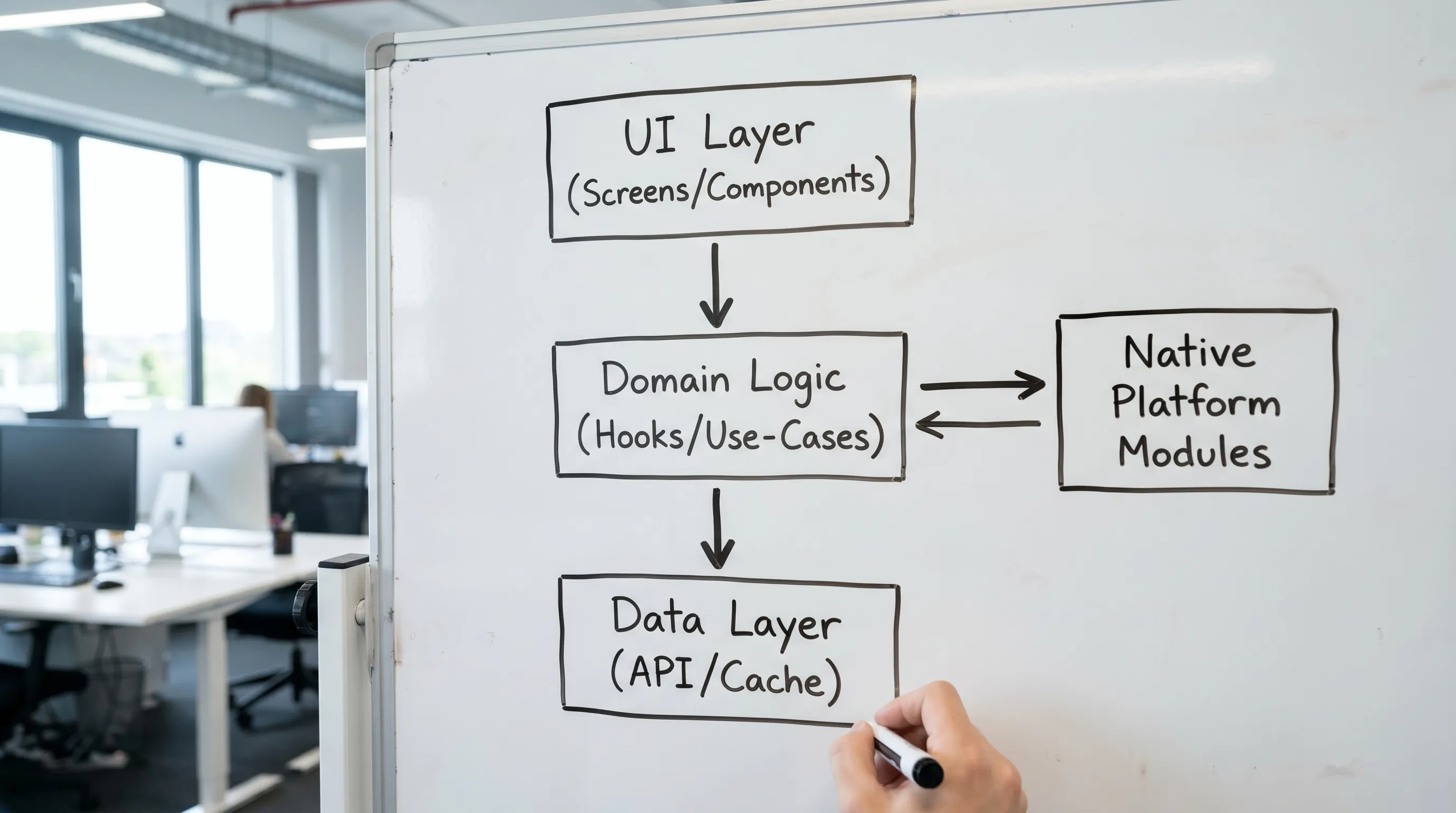
- Keep UI components separate from domain logic.
- Keep networking and persistence behind a thin data layer.
- Put each feature behind a clear boundary (screen, hooks, state, service calls, tests).
This reduces merge conflicts, speeds up onboarding, and makes it easier to delete or rewrite features without collateral damage.
5) Choose state and data tools based on failure modes
“Which state management library is best?” is less important than “what can break in production?” For most mobile products, the biggest real-world problems are:
- Stale data and confusing refresh behavior
- Race conditions during navigation
- Offline and flaky network states
- Inconsistent cache invalidation
Best practice in 2026: separate server-state from UI-state.
- Server-state (API data, pagination, retries, caching) benefits from tools designed for it.
- UI-state (local toggles, draft forms, modal visibility) should remain lightweight.
If you do this separation well, your app becomes easier to reason about, and performance often improves because you reduce unnecessary renders.
6) Performance: measure first, then optimize what users feel
React Native performance work should be driven by user impact, not folklore. Your optimization loop should look like:
- identify the slow interaction, 2) reproduce reliably, 3) measure, 4) apply a targeted fix, 5) prevent regression.
Common bottlenecks and fixes:
| Symptom users notice | Typical root cause | Best-practice fix in 2026 |
|---|---|---|
| Janky lists | Too many rerenders, heavy item components | Virtualized lists, stable keys, memoized row components, avoid inline closures in hot paths |
| Slow startup | Overloaded initial route, too much synchronous work | Defer non-critical work, code-split where practical, lazy-load heavy modules |
| Stutters during animations | JS thread contention | Use native-driven animation approaches when available, keep render work small |
| Blank images or memory spikes | Unbounded image sizes | Resize/compress assets, cache smartly, avoid decoding huge images on low-end devices |
| “Random” freezes | Excessive logging, expensive JSON parsing | Reduce debug logs in production, move heavy work off the main path |
Also keep your platform UX expectations grounded in Apple and Google guidance. Apple’s Human Interface Guidelines are still the best north star for iOS feel.
7) Testing: cover the flows that can cost you revenue
Testing in React Native should mirror how you lose money or trust:
- onboarding breaks
- login and session handling fails
- payments and subscriptions misbehave
- push notifications or deep links route incorrectly
- app updates cause crashes on launch
A practical pyramid:
- Unit tests for pure logic (formatting, validation, state transitions)
- Component tests for critical UI logic
- End-to-end tests for the top revenue and retention flows
For E2E, many teams still rely on Detox. Whatever you choose, tie tests to CI so they run on every merge that can affect release.
8) CI/CD and release orchestration are part of the product
If your release process depends on a single engineer’s laptop, you do not have a mobile product, you have a demo.
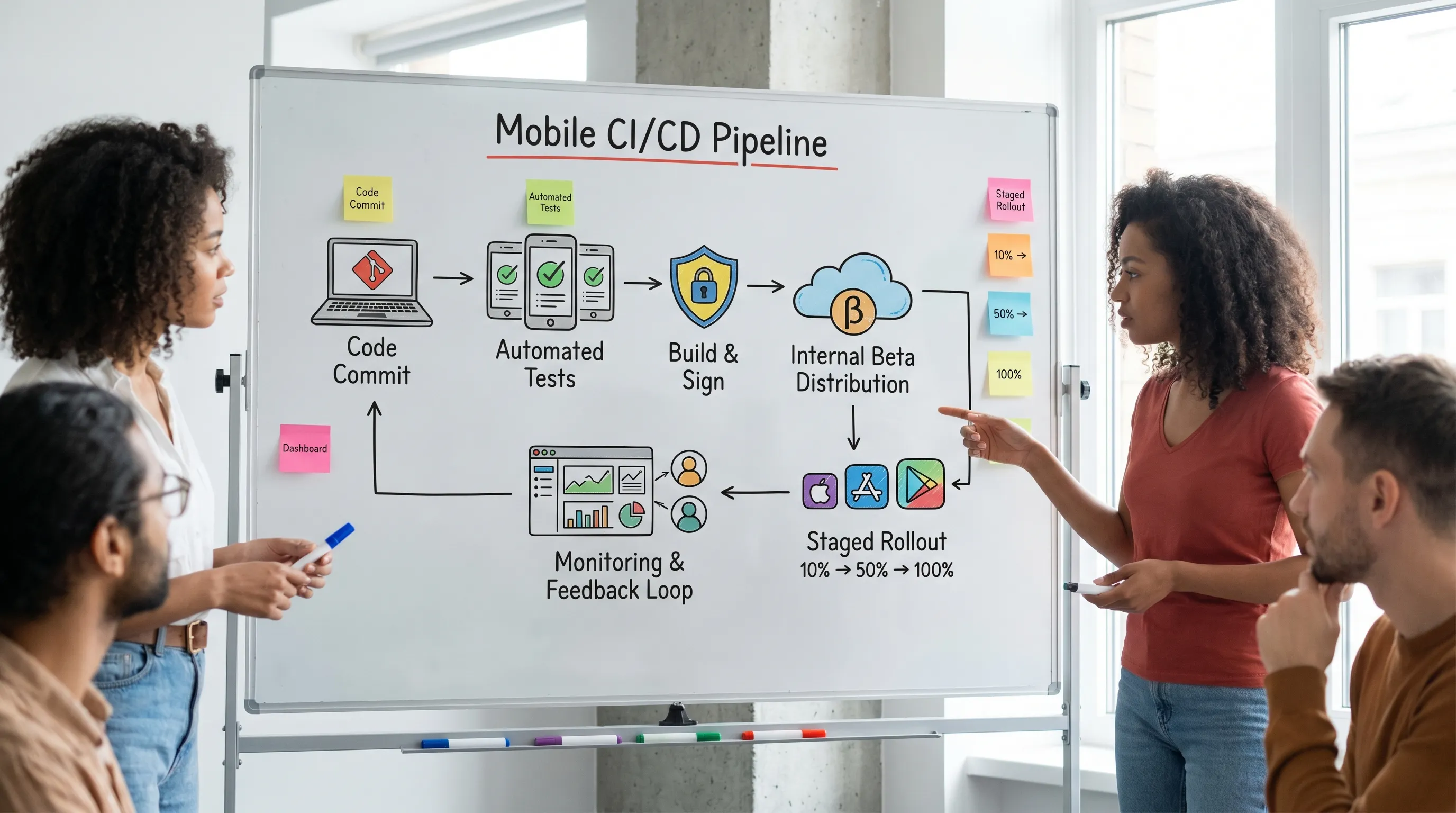
Best practices for 2026:
- Automate signing and builds (and audit who has access).
- Use separate environments (dev, staging, production) with clear API endpoints and feature flags.
- Create a release checklist that covers policy items: privacy disclosures, account deletion flows, and reviewer notes.
- Use staged rollouts and monitor crash-free sessions before ramping.
App Store and Play policy failures can block growth even when your engineering is strong. Appzay’s App Store submission checklist can help you operationalize those requirements.
9) Observability: ship with receipts (crashes, performance, and behavior)
In 2026, “we’ll add analytics later” usually means you will debate opinions instead of reading data.
Minimum observability to ship with confidence:
- Crash reporting with symbolication and release tracking
- Performance monitoring (startup time, slow renders, network spans)
- Event instrumentation for key product loops (activation, retention actions)
- A lightweight way to link behavior to releases (build number, feature flags)
Sentry’s React Native monitoring documentation is a solid reference for what “production-grade” looks like.
10) Security and privacy: design it in, do not patch it in
React Native apps often fail security reviews for predictable reasons: secrets in the client, weak session storage, or overly broad permissions.
Best practices:
- Never ship API keys or privileged credentials that can damage your backend if extracted.
- Store sensitive tokens in platform-secure storage (Keychain/Keystore via well-maintained libraries).
- Use certificate pinning only if you can maintain it safely, otherwise focus on solid TLS defaults and backend controls.
- Treat permissions as a UX flow, not a checkbox, request “just in time” and explain value.
If you want a structured benchmark, OWASP’s MASVS is widely used to frame mobile security expectations.
11) Dependency hygiene and upgrade cadence: avoid the “big rewrite” trap
React Native moves fast, and the ecosystem moves with it. The best way to avoid painful migrations is to upgrade continuously.
Operational habits that work:
- Schedule upgrades as recurring engineering work (not as a once-a-year fire drill).
- Keep third-party libraries on a short leash, fewer dependencies means fewer broken upgrades.
- Track native changes explicitly, especially if you maintain custom modules.
- Make “upgrade readiness” part of your definition of done for new features.
This is the unglamorous work that keeps your app stable when the team grows and when the store policies change.
12) AI features in React Native: ship value without shipping risk
Many 2026 roadmaps include AI, but mobile constraints are real: privacy, latency, cost, and on-device limitations. The best practice is to treat AI like any other product capability: define the job, define failure states, instrument outcomes, and plan for iteration.
Common pitfalls include sending sensitive user data to third-party APIs without a clear disclosure, building a single model-dependent flow with no fallback, and underestimating prompt and output QA.
If you are exploring automation or AI-enabled workflows around your product (support tooling, content pipelines, internal ops, or AI-assisted features), an AI opportunity audit from a specialist team like Impulse Lab can help you identify high-ROI use cases and adopt AI safely.
A 2026 “release-ready” checklist for React Native teams
Use this as a final gut-check before you call your app production-ready.
| Area | What “good” looks like | Quick validation |
|---|---|---|
| Architecture | Feature modules, clean boundaries, minimal custom bridging | New engineer can add a feature without touching unrelated folders |
| Performance | Budgets defined and tracked | Cold start and top 3 screens measured on low-end Android |
| Quality | Automated tests for critical flows | CI blocks merges when tests fail |
| Releases | Automated builds, staged rollouts, rollback plan | Anyone can cut a release using documented steps |
| Compliance | Privacy disclosures, permissions, account flows align with policies | Preflight review against App Store and Play requirements |
| Observability | Crashes and key events tracked by release | You can answer “what broke in this release?” in minutes |
Frequently Asked Questions
Are React Native apps still “good enough” for premium UX in 2026? Yes, if you budget for performance, measure real devices (including low-end Android), and design for platform conventions. The gap usually comes from shortcuts, not from React Native itself.
Should we use Expo or a bare React Native setup in 2026? It depends on your need for custom native code, release constraints, and team experience. Many teams start faster with Expo, then evolve as requirements harden. The best practice is to decide based on native module needs and upgrade strategy, not hype.
What is the biggest mistake teams make with React Native performance? Optimizing randomly. Set performance budgets, measure the top user flows, and fix bottlenecks that users feel (startup, scrolling, navigation transitions).
How often should we upgrade React Native? Treat upgrades as continuous maintenance. Smaller, frequent upgrades are significantly cheaper and safer than large jumps.
What should we instrument before launch? Crash reporting, release tracking, and events for your activation and retention loop. Without these, you are guessing during the most important iteration window.
Build a launch-ready React Native app with Appzay
If you are a funded startup and need a React Native team that can handle product strategy, UX, engineering, CI/CD, store launch, and post-launch support end-to-end, Appzay partners as a technical co-founder from concept to App Store.
Explore Appzay’s approach to end-to-end mobile app development services, or reach out via Appzay to discuss your roadmap and the fastest path to a polished, scalable release.