6/22/2026
What Great Mobile Application Design and Development Looks Like
See what great mobile application design and development includes, from strategy and UX to native engineering, testing, launch, and support.
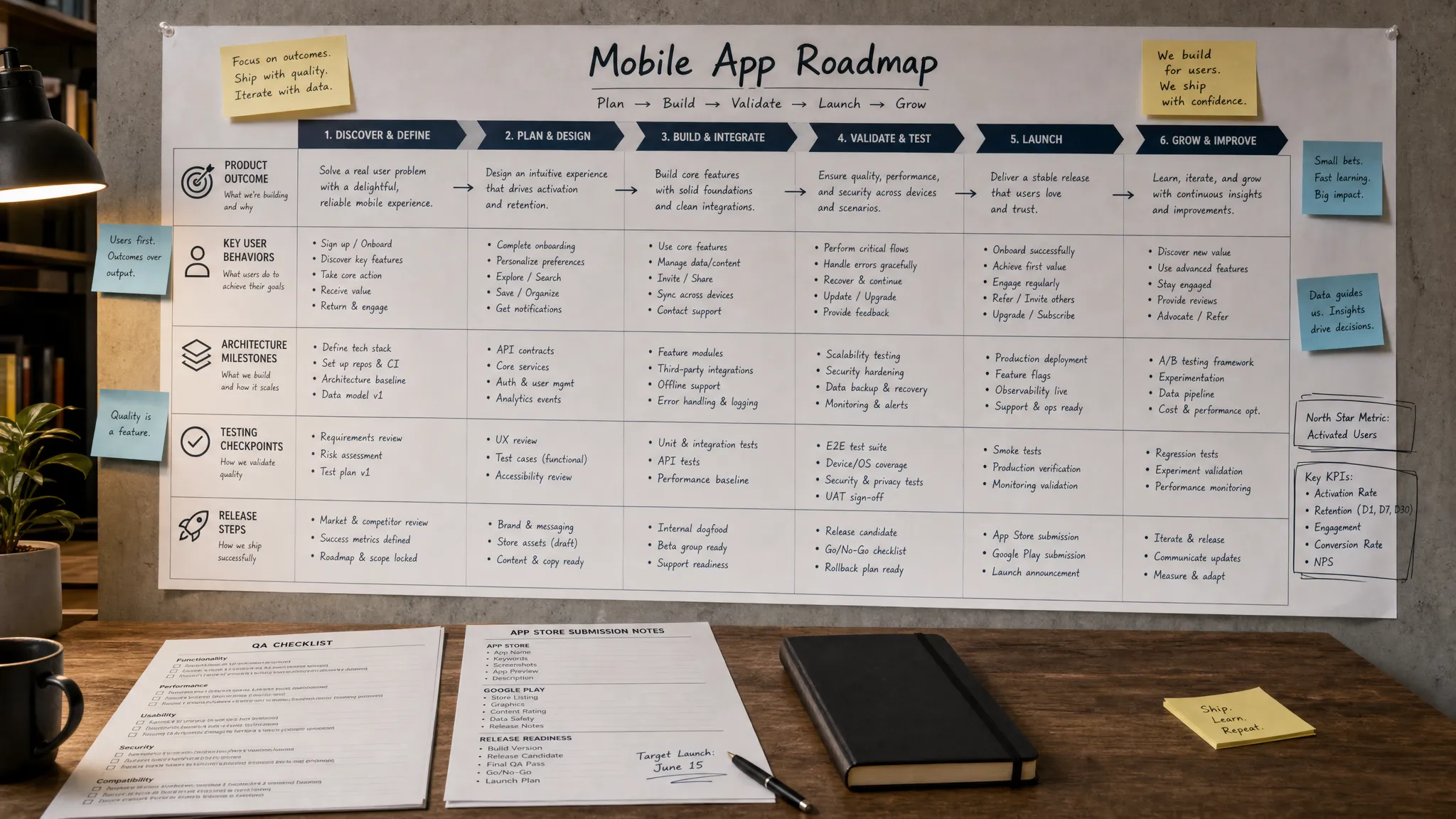
Great apps feel simple because the work behind them is not simple. For a founder, the phrase mobile application design and development can sound like a single vendor line item: make the screens, write the code, submit to the stores. In reality, the quality difference between an average app and a great app is usually decided long before the first public release.
The strongest teams do not treat design and development as separate phases. They connect market assumptions, user behavior, UX systems, architecture, testing, release planning, and post-launch learning into one product process.
That matters in 2026 because users have little patience for confusing flows, slow screens, broken payments, vague privacy controls, or unstable releases. Apple and Google continue to raise expectations through platform conventions, privacy requirements, and review policies. Investors and early customers also expect more than a clickable demo. They expect a product that can prove traction, handle real usage, and evolve without collapsing under technical debt.
So what does great mobile application design and development actually look like? It looks less like a pretty Figma file handed to an engineering team and more like a disciplined path from problem to shipped product.
Great work starts with the product outcome
A good mobile app team does not begin by asking how many screens you need. It begins by asking what the product must make possible for the user and the business.
Before design patterns or technology choices matter, the team should be able to explain the app in terms of a clear outcome. Who is the app for? What painful or valuable job does it solve? What behavior should happen repeatedly? What metric will show that the product is working? What needs to be true for this first version to earn more investment?
For funded startups, this is especially important. A first release should not be a miniature version of a huge product vision. It should be a focused product system that proves the most important user behavior. If you are planning that stage now, Appzay has a deeper guide on mobile app design and development for funded MVPs that explains how to keep scope tied to traction.
The output of this early work is not a vague strategy deck. It should create practical product clarity, including:
- A specific user segment and use case.
- A core product promise that can be tested.
- The primary user loop, such as discover, act, receive value, return.
- The first version of the feature set, with clear exclusions.
- Success metrics for activation, retention, revenue, or operational efficiency.
- Major constraints, such as budget, timeline, compliance, integrations, and platform requirements.
When this foundation is missing, design becomes guesswork and development becomes expensive improvisation. When it is present, every decision has a purpose.
Great design makes the right behavior easy
Mobile design is not just visual polish. Strong app design turns a product strategy into flows that users can understand, trust, and complete without unnecessary friction.
This starts with the core loop. A fitness app might need users to choose a plan, complete a workout, see progress, and come back tomorrow. A marketplace might need users to search, compare, trust, book, pay, and communicate. A business app might need employees to capture data accurately in the field and sync it back to the system of record.
Great UX design identifies that loop and removes ambiguity from it. It also designs the moments that weak products often forget: onboarding, empty states, loading states, permission requests, errors, account recovery, payment failures, slow networks, and first-time trust signals.
Platform conventions matter too. iOS and Android users bring expectations with them. The Apple Human Interface Guidelines and Google Material Design are not just style references. They help teams make apps that feel natural on the devices people already use every day. Accessibility should also be treated as a baseline rather than an afterthought, with standards such as WCAG 2.2 helping teams design more usable experiences for more people.
Here is what strong design looks like compared with a weaker process:
| Area | Great version | Weak version |
|---|---|---|
| Product flow | Built around the core user behavior | Built as isolated screens |
| Onboarding | Explains value quickly and asks for only necessary input | Creates a long setup before users see value |
| Visual system | Uses consistent components, spacing, states, and hierarchy | Relies on one-off screens with inconsistent patterns |
| Accessibility | Considers contrast, touch targets, text scaling, and screen reader behavior | Treats accessibility as a late QA task |
| Edge cases | Designs empty, loading, error, and success states | Assumes the happy path is enough |
| Prototype | Tests real user journeys before engineering commitment | Shows polished mockups without validating flow |
If your team is still figuring out the journey, it is worth studying how to create clear user flows before investing heavily in high-fidelity screens.
Great development is product thinking in code
Development is where many app projects reveal whether the design process was real. A strong engineering team does not simply implement screens pixel by pixel. It asks whether the product will work reliably under real-world conditions.
That means thinking through architecture before feature production accelerates. How will the app authenticate users? Which data needs to be available offline? What happens when a user loses connection in the middle of a transaction? How should push notifications be triggered? Which parts belong in native code, which belong in backend services, and which require third-party integrations?
For premium mobile applications, engineering choices must support the product roadmap. The first version should not be overbuilt, but it should be built in a way that can evolve. Clean architecture, clear API contracts, strong state management, automated tests, and a reliable release process are not luxuries. They protect speed later.
This is where native iOS and Android engineering, distributed systems architecture, cloud integration, CI/CD, and release orchestration become more than technical buzzwords. They determine whether a team can ship improvements confidently after users arrive.
Great development also includes security and privacy thinking from the start. Depending on the product, that may mean secure authentication, careful handling of personal data, encrypted communication, permission minimization, and testing against common mobile risks. The OWASP Mobile Application Security Verification Standard is a useful reference for teams that want a structured view of mobile app security requirements.
Quality shows up in details users barely notice
Users usually do not praise an app for handling a slow connection gracefully. They simply keep using it. They rarely notice that a release pipeline catches regressions before App Store submission. They just experience fewer bugs. Great mobile application design and development is often visible through the absence of frustration.
A strong app feels fast because the team designed loading behavior, data fetching, caching, and transitions carefully. It feels trustworthy because permissions are requested in context and the app explains why sensitive access is needed. It feels polished because buttons respond predictably, forms prevent avoidable mistakes, and errors tell users what to do next.
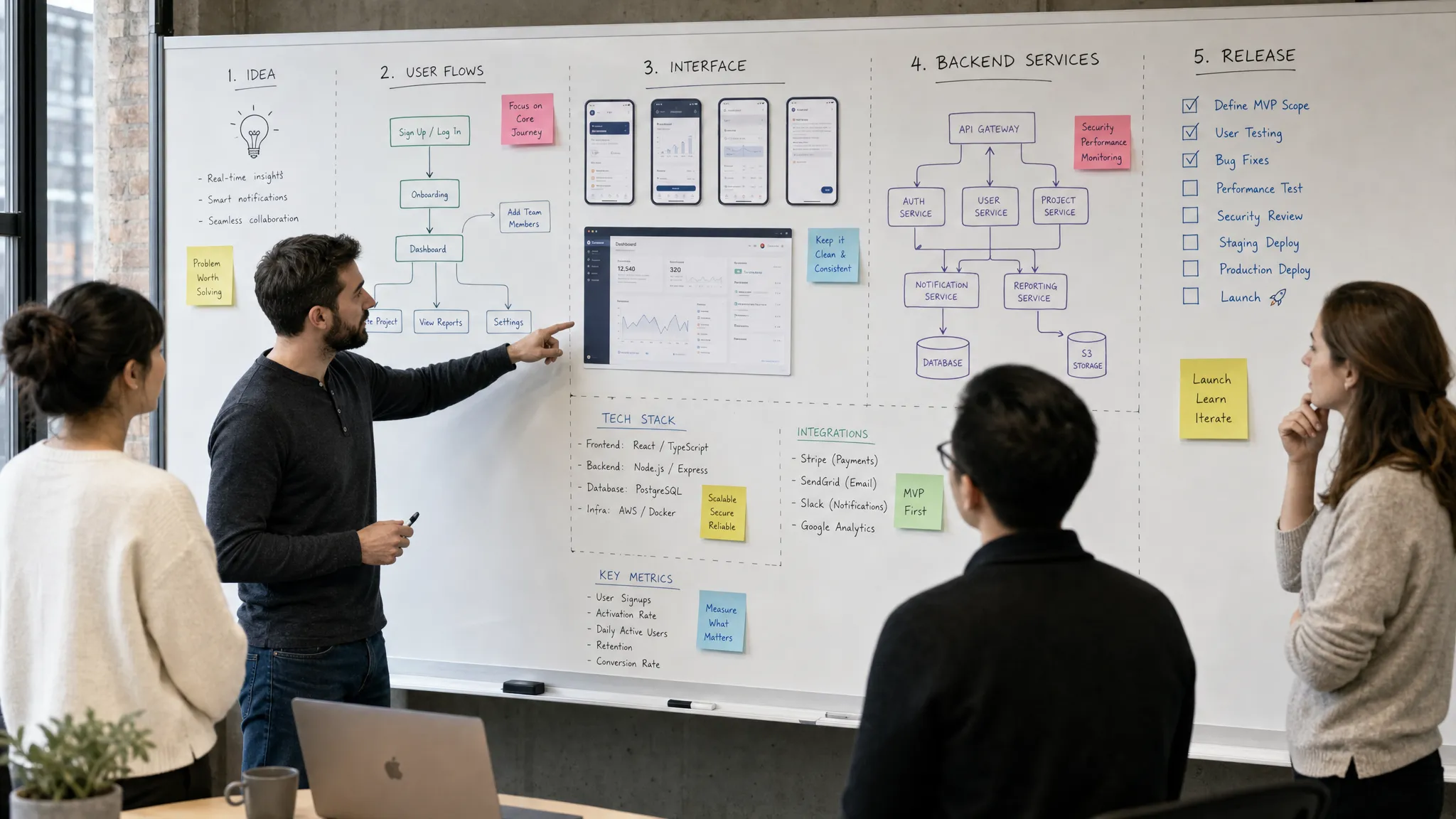
Quality also includes release readiness. App Store and Google Play submission is not a final admin task to think about after development is finished. Store requirements influence privacy disclosures, screenshots, review notes, content policies, account setup, and sometimes feature behavior. Apple publishes detailed App Review Guidelines that teams should understand early, especially if the app involves subscriptions, user-generated content, health data, payments, or regulated categories.
The best teams make launch boring in the best possible way. There is a checklist. Builds are signed correctly. Test devices have been covered. Crash reporting is ready. App metadata is prepared. Rollback and hotfix paths are understood. Support channels are clear. Stakeholders know what happens on launch day and what happens in the first week after launch.
Great teams reduce rework before code is written
Rework is one of the most expensive problems in app development. It often happens because teams move too quickly from idea to interface, then from interface to code, without resolving the decisions that connect them.
A great team slows down in the right places so it can move faster later. It clarifies the product promise. It maps complete journeys. It identifies technical unknowns. It prototypes risky interactions. It documents acceptance criteria. It defines the component system. It discusses backend implications before finalizing UX.
This does not mean spending months in planning. It means making the important product and technical decisions while they are still cheap to change. Appzay covers this approach in more depth in its guide to designing the app before writing code.
Healthy collaboration between design and engineering is a major signal here. Designers should understand implementation constraints. Engineers should understand user intent. Product leaders should understand tradeoffs. When these roles operate together, the app becomes more coherent and the build becomes more predictable.
What founders should look for in a mobile app partner
Choosing a mobile app partner is not just about portfolio quality. Beautiful screenshots are easy to admire, but they do not prove that a team can ship a reliable product.
A strong partner should be able to explain how strategy, UX, engineering, testing, deployment, and maintenance connect. They should ask uncomfortable questions about scope, user value, risk, and business goals. They should be willing to challenge features that do not support the first version. They should also be able to describe how the product will be maintained after launch.
Use this table as a practical evaluation guide:
| Stage | What a strong partner produces | Founder question to ask |
|---|---|---|
| Discovery | Product goals, user assumptions, risks, and MVP scope | What behavior are we trying to prove first? |
| UX design | Core flows, prototypes, edge states, and interaction logic | Can a first-time user complete the main journey easily? |
| UI system | Components, visual hierarchy, accessibility decisions, and platform patterns | Will this design scale beyond the first few screens? |
| Engineering | Architecture, native app implementation, integrations, and test coverage | How will this app remain stable as usage grows? |
| Launch | Store assets, release process, QA, monitoring, and support plan | What could block approval or damage the first user experience? |
| Post-launch | Maintenance, analytics review, iteration planning, and technical support | How will we learn and improve after release? |
The best partners feel less like a vendor waiting for instructions and more like a technical co-founder style team that helps turn decisions into a shippable product.
Launch is not the finish line
The first App Store release is a milestone, not the end of the work. Real users will expose assumptions that no workshop, prototype, or internal QA pass can fully predict.
Great app teams plan for that reality. They define which metrics matter after release, such as activation, retention, conversion, feature adoption, crash-free sessions, or support volume. They listen to qualitative feedback without overreacting to every request. They separate urgent fixes from product learning. They maintain the app as operating systems, device behaviors, APIs, and store requirements change.
This is where proactive maintenance and support become part of the product strategy. An app that is not maintained slowly becomes less trustworthy, less secure, and less compatible. For startups, that can weaken user confidence at the exact moment the company needs momentum.
Great mobile application design and development therefore includes a plan for the product after it reaches users. The goal is not only to launch. The goal is to keep earning usage.
A practical quality checklist
If you want a simple way to evaluate whether your app project is on the right track, look for these signals before development goes too far:
- The product has a clear target user, use case, and success metric.
- The MVP scope is tied to the core behavior, not a wishlist.
- The main user flows are mapped from entry point to completion.
- Onboarding, permissions, empty states, loading states, and errors are designed.
- The UI system uses reusable components and platform-aware patterns.
- Engineering has reviewed the design for feasibility, risk, and architecture.
- API contracts, data requirements, security needs, and integrations are understood.
- Testing, CI/CD, release orchestration, and App Store submission are planned before launch week.
- Post-launch support, maintenance, and iteration responsibilities are clear.
If several of these are missing, the project may still produce an app, but it is unlikely to produce a durable product.
Frequently Asked Questions
What is mobile application design and development? Mobile application design and development is the combined process of defining, designing, engineering, testing, launching, and improving a mobile app. Design covers product strategy, UX, UI, and interaction behavior. Development turns that system into reliable iOS, Android, backend, and release infrastructure.
How do I know if an app design is ready for development? A design is ready when the core flows are complete, edge cases are defined, components are consistent, user states are clear, and engineering has reviewed feasibility. A beautiful mockup is not enough if it does not explain how the product behaves in real conditions.
Should a startup build an MVP or a full product first? Most startups should begin with a focused MVP that proves the most important user behavior. The goal is not to build something small for its own sake. The goal is to build the smallest serious version that can generate learning, traction, and confidence for the next stage.
What separates premium app development from basic implementation? Premium app development connects product strategy, UX, native engineering, architecture, testing, release planning, and support. Basic implementation often focuses only on turning screens into code, which can create usability problems, technical debt, and launch risk.
Why is post-launch support part of great app development? Mobile apps depend on operating systems, devices, APIs, store policies, and user expectations that change over time. Post-launch support keeps the app stable, secure, compatible, and aligned with what users actually do after release.
Build an app that is designed to ship and grow
If you are building a funded startup app, the goal is not just to make something that looks good in a pitch deck. The goal is to design, build, launch, and support a product that real users can trust.
Appzay partners with founders on end-to-end mobile app development, from product strategy and UX design to native iOS and Android engineering, release orchestration, App Store optimization, and ongoing support. If you want a technical partner that can help turn a strong idea into a shipped mobile product, Appzay can help you move from concept to App Store with clarity.