6/27/2026
React for App Development: When It Fits and When It Fails
React for app development can speed up startups, but it is not always the right stack. Learn when it fits, fails, and what to choose.
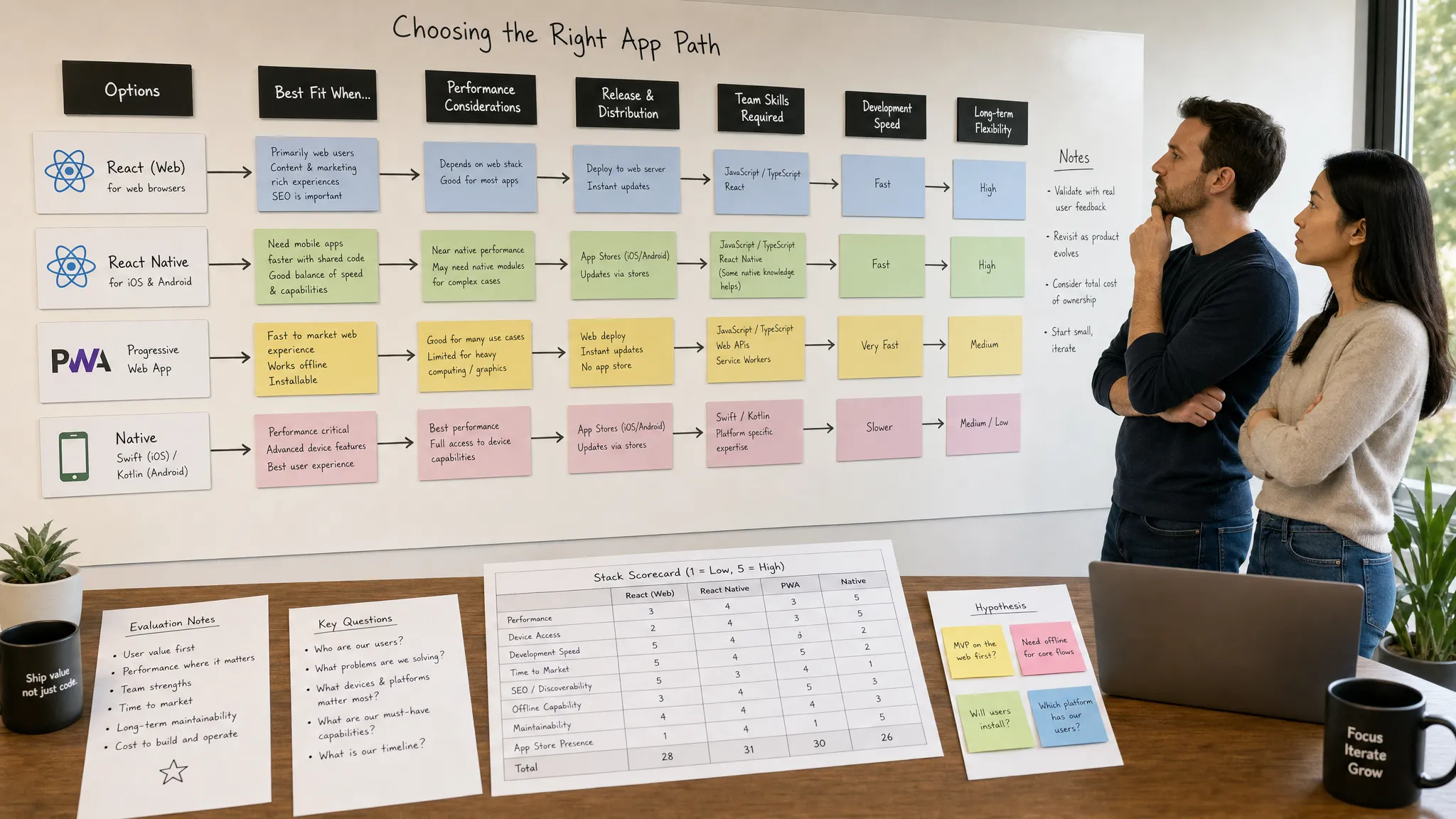
React is often presented as the safe default for modern app development. It is popular, flexible, and familiar to many engineering teams. For funded startups, that makes it tempting: one ecosystem, fast iteration, reusable patterns, and a large talent pool.
But “React for app development” can mean several different things. It may mean a React web app, a progressive web app (PWA), a React Native mobile app, or a product with React on the web and native code on iOS and Android. Those options are not interchangeable.
The real question is not whether React is good. It is whether React fits the product, users, performance requirements, release plan, and long-term operating model. When it fits, React can help a startup move quickly without sacrificing quality. When it fails, it usually fails because the team chose it for the wrong reasons.
First, clarify what “React for app development” means
React itself is a JavaScript library for building user interfaces. The official React documentation describes it as a way to build UI from reusable components. That model is powerful for web products, dashboards, portals, marketplaces, SaaS tools, and content-heavy applications.
For mobile apps, the conversation usually shifts to React Native. React Native uses React concepts to build iOS and Android apps with native UI components. It is not simply a website wrapped inside an app shell, and it is not identical to native Swift or Kotlin development.
For founders, the distinction matters because each path has different trade-offs.
| Option | Best fit | Where it struggles |
|---|---|---|
| React web app | Browser-based products, dashboards, internal tools, SaaS interfaces | App Store distribution, deep mobile hardware features, offline-first mobile UX |
| React PWA | Lightweight mobile-accessible products, content tools, transactional flows | Native install expectations, some platform-specific capabilities, App Store visibility |
| React Native | Cross-platform mobile apps with shared product logic and native UI | Highly specialized device features, ultra-demanding graphics, platform-specific UX extremes |
| Native iOS and Android | Performance-critical, hardware-heavy, or platform-first experiences | Higher cost and duplicated implementation across platforms |
If you are comparing React Native to fully native development, Appzay has a deeper breakdown of how to choose between a native app and React. This article focuses on the broader decision: when the React ecosystem helps your app strategy and when it becomes a liability.
When React fits app development well
React is strongest when the product benefits from modular interfaces, fast iteration, shared engineering practices, and a strong web or cross-platform strategy. It fits especially well when the hardest part of the product is not low-level device performance, but shipping a polished experience quickly and improving it based on real user behavior.
You need to validate and iterate quickly
Startups rarely get the first version exactly right. User onboarding, pricing flows, search behavior, permissions, notifications, and retention loops all change after launch. React’s component model makes it easier to adjust screens, reuse UI patterns, and test new flows without rebuilding everything from scratch.
That does not mean React removes the need for architecture. A messy React codebase can become expensive fast. But when paired with disciplined product strategy, TypeScript, clear design systems, and automated testing, React can support rapid learning without turning the app into a prototype that cannot scale.
This is one reason React Native is often attractive for funded startups that need both iOS and Android. A shared foundation can reduce duplicated work while still producing real mobile apps. For a more focused mobile perspective, see Appzay’s guide to React Native for mobile app development.
Your product has a lot of repeatable UI patterns
React works well when an app is built from repeatable interface elements: cards, feeds, forms, profiles, dashboards, modals, search results, checkout flows, and settings screens.
Examples include:
- Marketplaces with listings, filters, profiles, messaging, and payments
- SaaS platforms with user roles, workflows, analytics, and admin panels
- Consumer apps with feeds, onboarding, subscriptions, and account management
- Creator tools with content libraries, sharing flows, and monetization features
- Operational apps for field teams, logistics, scheduling, or reporting
These apps still require thoughtful engineering, but their complexity is often product complexity rather than low-level rendering complexity. React is well suited to that kind of problem.
You want a connected web and mobile product
Many startups do not only need an app. They need a customer-facing mobile app, an admin dashboard, a marketing site, internal tools, analytics views, and support workflows. React can help unify the engineering approach across those surfaces.
For example, a startup might use React for its web dashboard and React Native for its iOS and Android apps. The UI code will not be fully identical, but product logic, validation rules, API clients, state patterns, test strategies, and developer knowledge can often be shared.
This is particularly useful when your product depends on cloud workflows, files, payments, and chat-based sharing. If your roadmap includes AI-assisted file handling or pay-to-unlock digital content, studying products like Telegram-first AI file control can help you think through how many integrations your app will need before choosing a stack.
You have access to strong JavaScript and TypeScript talent
Technology choices are partly product decisions and partly team decisions. React is a good fit when your team already understands JavaScript or TypeScript, component architecture, API-driven apps, testing, and modern release workflows.
A great React team can build a maintainable product. A weak React team can produce a fragile one. The framework will not compensate for poor state management, inconsistent design implementation, weak test coverage, or rushed release orchestration.
In practice, React works best when the team treats it as part of a serious product engineering system, not as a shortcut.
When React Native is the right mobile choice
If your target is the App Store and Google Play, React Native is usually the React-based option under consideration. It fits when you want native mobile distribution, a shared cross-platform foundation, and a product experience that does not depend on highly specialized native capabilities.
The React Native documentation explains that it renders using native platform components. That distinction matters. A well-built React Native app can feel native, access device capabilities, and ship through app stores.
React Native is often a strong choice when:
- The app needs similar core functionality on iOS and Android
- The roadmap is still evolving and speed matters
- The product relies on APIs, cloud data, user accounts, media, forms, payments, or notifications
- The design system can be implemented consistently across platforms
- Native modules are limited, well understood, or isolated
This does not mean every screen must be shared. Serious React Native projects often include platform-specific branches, native modules, or custom iOS and Android work where needed. The win is not “write once and forget platforms.” The win is concentrating engineering effort where it matters most.

When React fails for app development
React usually fails for one of two reasons: the product has requirements the stack does not serve well, or the team expects React to eliminate engineering discipline. Both are avoidable if you evaluate the stack before committing.
The app is performance-critical at the device level
React is not the best default for every performance-heavy product. If your app depends on advanced graphics, real-time video processing, augmented reality, complex animation timelines, low-latency audio, intensive sensor usage, or game-like interaction, native development may be the safer path.
React Native can handle many polished consumer experiences, but there is a difference between “smooth app UI” and “performance-critical system.” When performance is central to the product promise, you should validate early with technical spikes, benchmarks, and native feasibility work.
If the experience is deeply tied to Apple-specific capabilities, Appzay’s guide on when native Swift app development is the right call is a useful companion read.
You need deep platform-specific behavior
Some products must feel intensely native on each platform. This can include Apple ecosystem integrations, Android-specific background behavior, complex widgets, advanced Bluetooth workflows, custom camera pipelines, health data integrations, or hardware-adjacent use cases.
React Native can integrate with native modules, but every native bridge adds complexity. If the app is mostly native modules connected by a thin React layer, the original reason for using React becomes weaker.
A useful test is simple: if 70% of the product risk lives in platform-specific native code, React may not be buying you much.
You are building a PWA but users expect a real mobile app
React web apps and PWAs can be excellent for many products. They are easy to access, fast to update, and do not require app store approval. But they are not always a replacement for native mobile apps.
If users expect push notifications, home screen presence, native sharing, offline reliability, biometric flows, app store discovery, or a premium mobile feel, a PWA may fall short. The gap depends on your audience and use case.
For internal tools or lightweight customer portals, a PWA may be enough. For consumer products where trust, retention, and repeat usage matter, an app store presence can be part of the product experience.
The team treats React as a cost-cutting shortcut
React can reduce duplicated effort, but it is not a magic budget reducer. High-quality app development still requires discovery, UX design, architecture, backend integration, testing, CI/CD, store preparation, analytics, monitoring, and ongoing maintenance.
The most expensive React projects are often the ones that started as “quick builds.” They launch with unclear navigation, inconsistent state, untested edge cases, slow screens, brittle dependencies, and no release process. Six months later, every feature becomes risky.
React fails when speed replaces discipline. It succeeds when speed is supported by discipline.
A practical decision framework
A good stack decision should come from product constraints, not preference. Before choosing React for app development, evaluate the product across these dimensions.
| Decision factor | React web or PWA may fit | React Native may fit | Native may fit |
|---|---|---|---|
| Distribution | Users can access via browser | App Store and Google Play matter | App stores matter and platform depth is critical |
| UX expectations | Responsive web experience is acceptable | Native-feeling cross-platform UX is needed | Platform-specific UX is a differentiator |
| Performance risk | Mostly standard UI and API calls | Smooth mobile UI with moderate device integration | Heavy graphics, sensors, media, or low latency |
| Roadmap volatility | Fast changes are expected | Fast mobile iteration is needed | Requirements are stable but technically deep |
| Team capability | Strong web engineers | Strong React Native plus native support | Strong iOS and Android specialists |
| Budget focus | Web-first efficiency | Shared mobile foundation | Maximum platform control |
The right answer may also change over time. A startup might begin with React web to validate demand, move to React Native for mobile adoption, and later add native modules or native apps for specific platform advantages.
The mistake is not evolving the stack. The mistake is choosing a stack without knowing which constraints matter.
Common mistakes when using React for app development
Many React app problems are not caused by React itself. They come from poor implementation choices.
One common mistake is assuming a shared codebase means identical experiences. iOS and Android users have different navigation conventions, permission expectations, and UI patterns. Sharing code should not mean ignoring platform behavior.
Another mistake is adding libraries too quickly. React’s ecosystem is large, which is both a strength and a risk. Every dependency becomes part of your maintenance surface. Before adding a package, teams should ask whether it is actively maintained, compatible with the current stack, testable, and replaceable if the product changes.
State management is another frequent source of trouble. Small apps can often use simple local state and server-state libraries. Larger products need clear boundaries between server data, client UI state, authentication state, offline data, and cached resources. Without those boundaries, performance bugs and inconsistent screens become hard to debug.
Finally, teams often postpone release engineering. For mobile apps, CI/CD, signing, build environments, crash reporting, app store metadata, staged rollout plans, and versioning are not optional extras. They are part of the product’s ability to survive real users.
How Appzay approaches the React decision
At Appzay, the stack decision is part of the product strategy conversation. A funded startup does not only need code. It needs a product that can be designed, built, launched, measured, maintained, and improved.
That means evaluating React against the actual business and technical context: user journeys, platform expectations, performance risks, integration complexity, launch timeline, budget, and long-term scalability.
For some products, React Native is the right way to reach iOS and Android quickly with a strong shared foundation. For others, native iOS and Android development is the more responsible choice. For web-first products, React may be exactly the right core technology, especially when paired with a well-structured backend and cloud architecture.
The key is not to force React into every project. The key is to choose the architecture that gives the product the best chance to launch well and keep improving after launch.
Frequently Asked Questions
Is React good for app development? Yes, React can be excellent for app development when the product relies on reusable UI, fast iteration, API-driven workflows, and a strong web or cross-platform strategy. For mobile app store products, React Native is usually the React-based option to evaluate.
Is React the same as React Native? No. React is a JavaScript library for building user interfaces, usually on the web. React Native uses React concepts to build iOS and Android apps with native UI components.
Can React build iOS and Android apps? React itself does not build native mobile apps. React Native can be used to build iOS and Android apps, often with shared product logic and platform-specific native integrations where needed.
When should a startup avoid React Native? A startup should be cautious with React Native when the product depends on heavy graphics, advanced media processing, complex hardware integrations, or highly platform-specific experiences. Native development may reduce risk in those cases.
Is a React PWA enough instead of a mobile app? Sometimes. A React PWA can work well for web-first products, internal tools, and lightweight mobile access. It may not be enough when users expect app store distribution, native notifications, offline reliability, or a premium mobile experience.
Build the right app with the right stack
React can be a powerful choice, but only when it fits the product. The best teams do not choose React because it is popular. They choose it because it supports the roadmap, the user experience, the release plan, and the business model.
If you are deciding between React web, React Native, PWA, or native iOS and Android, Appzay can help you evaluate the trade-offs before development begins. From product strategy and UX design to engineering, deployment, App Store optimization, and post-launch support, Appzay partners with founders to turn funded startup ideas into high-quality mobile products.
Start with the stack that fits the product, not the other way around. Visit Appzay to plan your next app with a team that can take it from concept to launch.