6/25/2026
Mobile Architecture Basics for Scalable App Teams
Learn mobile architecture basics for scalable app teams, from layers and APIs to CI/CD, testing, and decisions that prevent rewrites.

Mobile architecture is not just a technical diagram. For a growing app team, it is the shared operating system that determines how quickly designers, product leads, iOS engineers, Android engineers, backend developers, and QA can make changes without stepping on each other.
A small team can often ship an MVP with informal structure. Everyone knows where the logic lives, why a shortcut exists, and which screens are fragile. But once the product gains traction, that informal knowledge becomes a bottleneck. New engineers need onboarding. Features start overlapping. Bugs appear in unexpected places. A simple UI change suddenly requires backend coordination, migration planning, and regression testing.
That is why scalable app teams need architecture basics early. Not heavyweight enterprise process, but enough structure to make growth easier.
What “scalable” really means in mobile architecture
Scalability is often reduced to server capacity, but mobile teams face several kinds of scale at the same time.
Technical scale means the app can handle more users, data, traffic, and edge cases without falling apart. Product scale means new features can be added without rewriting old ones. Team scale means more people can contribute without creating chaos. Release scale means the team can ship frequently while keeping quality high.
A scalable mobile app architecture supports all four. It should help the team answer questions like:
- Where should this business rule live?
- Can we change this screen without breaking another feature?
- How do iOS and Android stay consistent when the platforms differ?
- What happens if the network fails, data is stale, or the user is offline?
- How do we test this feature before it reaches production?
These questions are practical. They affect cost, launch speed, user experience, and investor confidence. For funded startups, architecture is not an academic concern. It is a way to preserve momentum after the first release.
The core layers every app team should understand
Most scalable mobile apps separate responsibilities into layers. The exact names vary by platform and framework, but the concept is consistent: each part of the app should have a clear job.
| Layer | Primary responsibility | Common examples |
|---|---|---|
| Presentation | What the user sees and interacts with | Screens, views, components, navigation |
| State and interaction | How the UI reacts to user actions and data changes | View models, presenters, controllers |
| Domain logic | Business rules that define product behavior | Eligibility rules, pricing logic, permissions |
| Data access | How the app retrieves and stores information | API clients, repositories, local databases |
| Infrastructure | Cross-cutting technical services | Analytics, logging, authentication, feature flags |
This structure keeps the UI from becoming the dumping ground for every decision. A screen should not directly know how to calculate a complex business rule, parse an API response, decide cache policy, track analytics, and handle navigation exceptions all at once.
When layers are separated, change becomes safer. A backend response can evolve without forcing a full UI rewrite. A business rule can be tested without launching the app. A screen can be redesigned without duplicating product logic.
Google’s Android architecture guidance emphasizes separation of concerns for similar reasons: clear boundaries make apps more testable, maintainable, and resilient to change.
Start with product boundaries, not folder names
A common mistake is to begin architecture work by debating folders, naming conventions, or framework preferences. Those details matter, but they should follow the product model.
Scalable teams first ask: what are the major domains of the product?
For example, a marketplace app might have user accounts, search, listings, messaging, payments, and reviews. A health app might have onboarding, plans, tracking, reminders, progress, and subscriptions. A fintech product might have identity, accounts, transactions, risk checks, notifications, and support.
Those product areas become natural boundaries. Each boundary can own its models, flows, API interactions, tests, and edge cases. This makes it easier to assign responsibility, onboard engineers, and understand the blast radius of a change.
For a deeper look at how architectural choices influence long-term product growth, Appzay’s guide to mobile app architecture choices that scale cleanly expands on how boundaries, business logic, and data flow affect future rewrites.
Keep business logic out of the UI
The fastest way to create a fragile app is to put too much logic inside screens. It may feel efficient during the first sprint, but it quickly creates hidden dependencies.
Imagine a subscription screen that decides which plan to show, calculates discounts, checks eligibility, handles trial rules, sends analytics, and updates the UI. If another screen later needs the same subscription logic, the team either duplicates it or extracts it under pressure. Both options create risk.
A better pattern is to keep business logic in a domain or service layer that can be reused and tested independently. The UI asks for the result, then displays it.
This approach helps when teams grow. Designers can iterate on screens while engineers trust that core product behavior remains consistent. Backend developers can adjust contract details while mobile engineers keep the user experience stable. QA can test rules directly instead of relying only on end-to-end flows.
Design data flow deliberately
Mobile apps live in imperfect conditions. Users switch networks, lose connectivity, background the app, open it on multiple devices, and expect the interface to remain fast. Architecture has to account for that reality.
A scalable team should define how data moves through the app:
- Which source is trusted when local and remote data disagree?
- When should the app show cached data instead of a loading state?
- What happens if a request succeeds on the server but the app closes before the response is processed?
- Which user actions should be optimistic, and which require server confirmation?
- How are errors surfaced to users, logs, and support teams?
Clear data flow prevents each feature team from inventing its own behavior. It also improves user trust. A consistent app feels intentional, even when something goes wrong.
For startups building cloud-backed products, the backend architecture matters just as much as the mobile client. Appzay’s guide to cloud-based app development for scalable apps covers the backend layers that often support mobile architecture, including APIs, authentication, storage, and scaling.
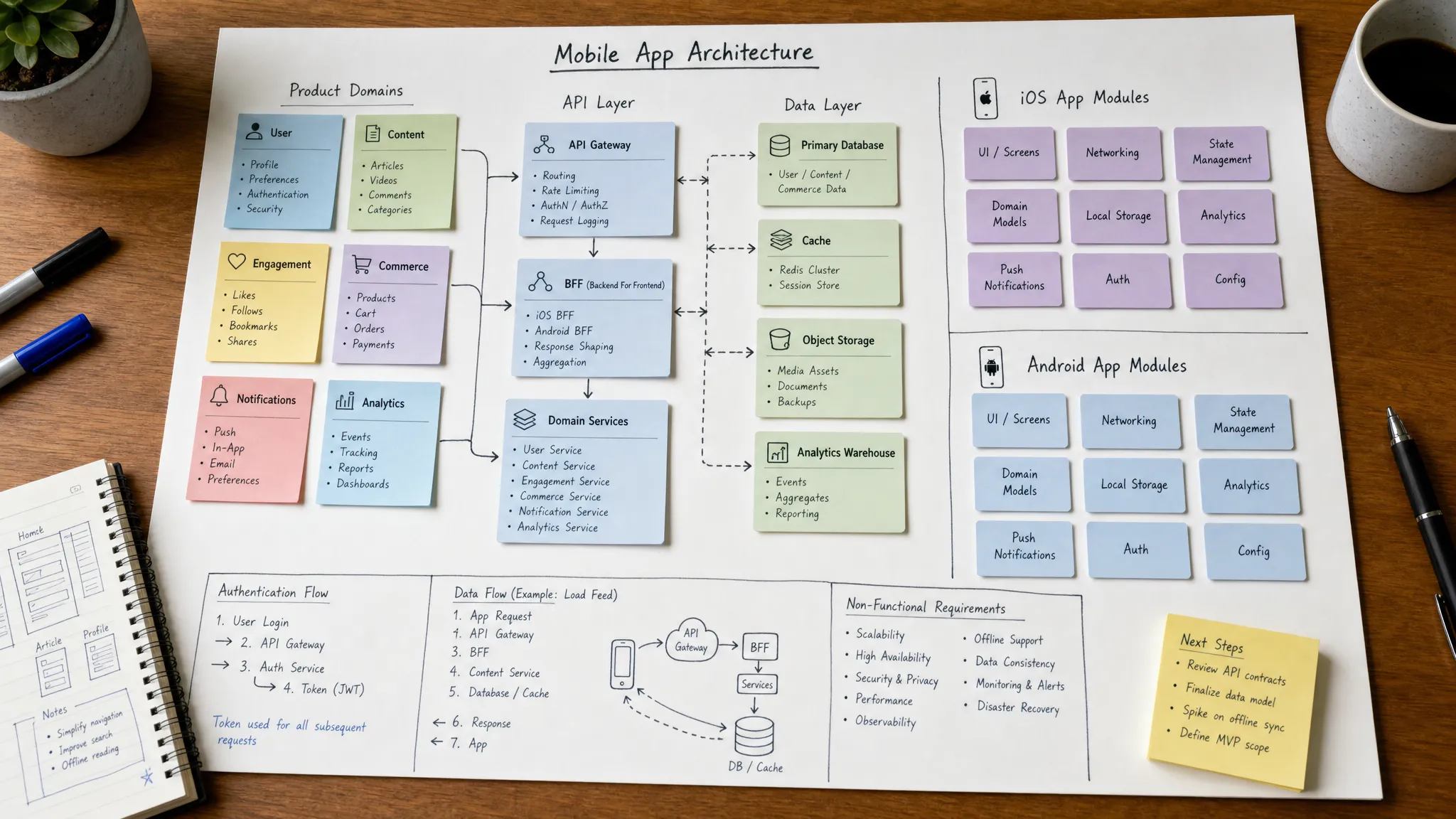
Treat API contracts as product infrastructure
APIs are not just backend implementation details. For mobile teams, they are long-lived contracts. Once an app version is in the App Store or Google Play, users may keep it installed for months or years. Unlike web apps, mobile clients cannot all be updated instantly.
That changes how teams should think about backend changes. Removing fields, changing response shapes, or altering error behavior can break older app versions. Even small changes can create support issues if the mobile client is not prepared.
Strong API practices include versioning when needed, documenting expected behavior, designing backward-compatible changes, and agreeing on error formats. Teams should also define ownership: who approves API changes that affect mobile, and how are iOS and Android updates coordinated?
A good API contract reduces uncertainty. It allows app teams to build features in parallel with backend work, write predictable tests, and avoid last-minute launch surprises.
Choose platform consistency without ignoring platform differences
Scalable app teams need consistency across iOS and Android, but consistency does not mean every implementation must be identical.
Users expect platform-native behavior. iOS and Android have different navigation conventions, permission patterns, notification behaviors, accessibility expectations, and store requirements. A scalable architecture respects those differences while keeping core product behavior aligned.
The goal is shared intent, not forced sameness. For example, the subscription eligibility rules should be the same across platforms. The way the screen animates, presents a modal, or handles system permissions may differ.
This is where strong product documentation and shared domain models help. Teams can agree on what the feature does, then let each platform implement it in a way that feels natural.
Build testing into the architecture
Testing is much harder when architecture is tangled. If every business rule is buried inside UI code, the team is forced into slow, brittle end-to-end tests. If logic is separated cleanly, more behavior can be tested quickly and reliably.
A balanced mobile testing strategy usually includes unit tests for business rules, integration tests for data and API behavior, UI tests for critical user flows, and manual exploratory testing for experience quality. The exact mix depends on the product, but the architecture should make testing possible without excessive setup.
Testability also improves team confidence. When a founder asks whether a critical feature can be changed before launch, the answer should not depend on hope. Good architecture gives the team feedback loops.
Plan for security and privacy from the beginning
Security is part of architecture, not a final checklist. Mobile apps often handle sensitive user data, authentication tokens, payments, identity documents, health information, location data, or private messages. Even if the first version is simple, early decisions can shape long-term risk.
Teams should define how the app stores sensitive data, manages sessions, refreshes tokens, handles permissions, validates inputs, and communicates with backend services. They should also decide what should never be stored on device.
The OWASP Mobile Application Security Verification Standard is a useful reference for mobile security expectations, especially for teams building apps in regulated or trust-sensitive categories.
Privacy also affects product design. Asking for permissions too early can hurt user trust. Collecting unnecessary data increases compliance burden. A scalable architecture makes data access intentional rather than accidental.
Use CI/CD to make architecture operational
Architecture only works if the team’s workflow reinforces it. Continuous integration and delivery practices help turn architecture decisions into daily habits.
For mobile teams, CI/CD can support automated builds, test execution, code quality checks, beta distribution, environment configuration, and release preparation. This reduces the manual work required to ship and makes regressions easier to catch.
The architecture should support these workflows. For example, environment-specific configuration should be cleanly separated. Features should be testable in staging. Release branches should not depend on hidden local setup. Dependencies should be managed consistently.
If your team is still shaping its release process, Appzay’s article on a mobile development workflow for faster product launches explains how discovery, UX, engineering, QA, and store readiness fit together.
Document decisions lightly, but consistently
Fast teams often avoid documentation because they fear bureaucracy. The problem is that undocumented architecture still exists, it just lives in someone’s memory.
Scalable teams document the decisions that future teammates will need to understand. This does not require long documents. A lightweight architecture decision record can capture the problem, options considered, chosen direction, tradeoffs, and date.
Good candidates for documentation include state management choices, backend contract decisions, authentication flow, offline behavior, analytics conventions, feature flag usage, and module boundaries.
The goal is not to freeze the architecture forever. The goal is to make decisions visible so they can be revisited with context.
Common architecture mistakes that slow app teams down
Many mobile architecture problems start as reasonable shortcuts. The issue is not that shortcuts exist. The issue is that teams forget to revisit them.
| Mistake | Why it hurts later | Better approach |
|---|---|---|
| Putting business rules in screens | Logic gets duplicated and becomes hard to test | Move product rules into domain or service layers |
| Treating APIs as temporary | Older app versions break when backend changes | Design contracts with compatibility in mind |
| Skipping error state design | Users see confusing failures and support gets vague reports | Define error behavior by feature and severity |
| Over-modularizing too early | The codebase becomes complex before the product is proven | Use product boundaries, then refine as the app grows |
| Ignoring release workflow | Manual steps create inconsistent builds and delays | Automate builds, tests, and release checks where practical |
The best architecture is not the most complicated one. It is the one that matches the product’s stage while leaving room for growth.
A practical baseline for scalable app teams
If you are building or refactoring a mobile app, start with a simple baseline. You do not need to solve every future problem today, but you should create enough structure to avoid predictable pain.
A strong baseline includes clear product domains, separated UI and business logic, documented API contracts, consistent error handling, secure data storage rules, basic automated testing, CI/CD foundations, and a shared release process.
This baseline gives the team a common language. It also helps founders make better tradeoffs. Instead of asking whether the architecture is “good,” the team can ask whether it supports the next stage of growth.
Frequently Asked Questions
What is mobile architecture? Mobile architecture is the structure that defines how a mobile app is organized, including UI, state management, business logic, data access, backend communication, security, testing, and release workflows.
When should a startup think about mobile architecture? A startup should think about architecture before the first serious build, especially if the app is funded, expected to scale, or likely to support multiple platforms. Early structure prevents avoidable rewrites later.
Does a simple MVP need architecture? Yes, but it needs the right amount. An MVP does not need enterprise-level complexity, but it should separate core responsibilities clearly enough that the product can evolve after launch.
How does architecture help app teams scale? Good architecture reduces hidden dependencies, makes features easier to test, clarifies ownership, supports parallel work, and helps new team members understand the codebase faster.
Is mobile architecture only about the app code? No. It also includes backend contracts, cloud infrastructure, data flow, CI/CD, security, analytics, QA practices, and release management.
Build the foundation before growth makes it expensive
Scalable mobile architecture is not about predicting every future feature. It is about making today’s decisions clear, testable, and adaptable enough that growth does not force a rewrite.
If you are a founder planning a high-quality iOS or Android product, Appzay can help turn your concept into a scalable app with product strategy, UX design, native engineering, cloud integration, release orchestration, and ongoing support handled end to end. Explore how Appzay partners with funded startups to build and launch mobile products designed for the next stage of growth.