6/6/2026
Mobile Development Workflow for Faster Product Launches
Build a faster mobile development workflow with discovery, UX, CI/CD, QA, beta testing, and launch gates that reduce rework.
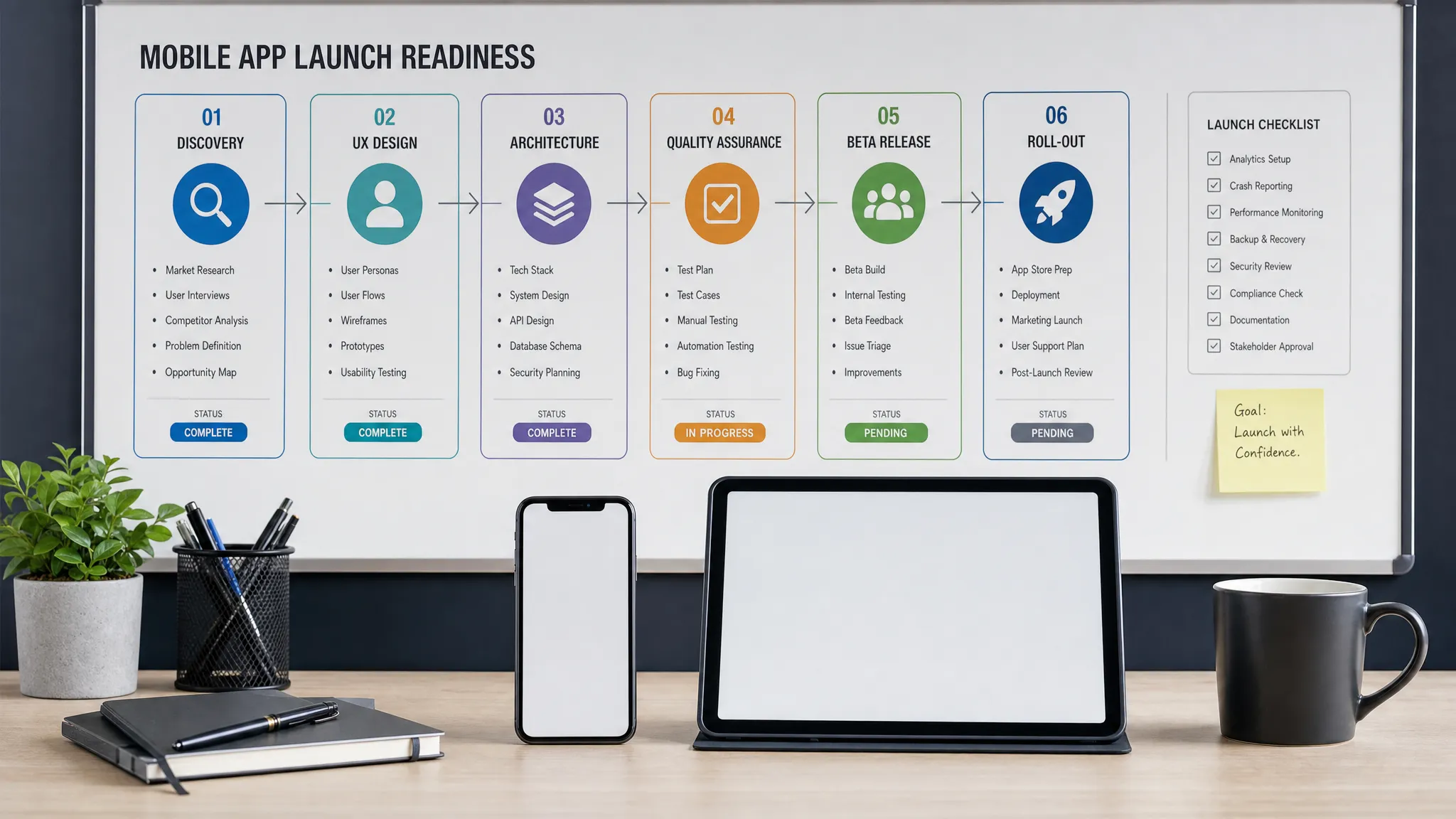
Faster mobile launches rarely come from “coding harder.” They come from a tighter mobile development workflow, one that turns decisions into build-ready artifacts, catches risk early, and keeps product, design, engineering, QA, and launch operations moving in parallel.
For funded startups, this matters because the first public release is not just a technical milestone. It is a market signal. Investors, early customers, partners, and app store reviewers all evaluate whether the product feels trustworthy, polished, and ready for real use. A rushed workflow can ship something quickly, but a disciplined workflow helps you launch faster without creating avoidable rework.
Below is a practical workflow Appzay uses as a model for high-quality iOS and Android launches, especially when founders need speed, clarity, and production-grade execution.
What a Fast Mobile Development Workflow Actually Means
A fast workflow is not the shortest path to an app build. It is the shortest reliable path to a launchable product.
That distinction matters. Many mobile projects lose weeks because teams treat strategy, UX, architecture, testing, and store readiness as sequential steps. The product brief is vague, designers create screens without engineering input, backend requirements appear too late, QA starts near the end, and App Store details become a last-minute scramble.
A better mobile development workflow compresses the timeline by reducing handoff friction. It makes decisions early, validates risky assumptions before full implementation, and creates release-quality habits from the first sprint.
The goal is to make every week produce something useful:
- A clearer product decision
- A tested user flow
- A working vertical slice
- A resolved technical risk
- A more stable release candidate
- A sharper launch plan
Speed comes from eliminating ambiguity, not skipping fundamentals.
The Core Principles Behind Faster Mobile Launches
Before looking at phases, it helps to define the operating principles that make the workflow work.
Start With the Launch Promise, Not a Feature List
A launch promise is the specific outcome your V1 app must deliver for its first users. It should be narrower than your long-term vision.
For example, “help sales reps capture meeting notes and sync them to a CRM in under one minute” is a launch promise. “Build an AI sales productivity platform” is a vision, but it is too broad to guide fast execution.
A strong launch promise helps your team decide what belongs in V1, what can wait, and what must be excellent from day one.
Build Vertical Slices Instead of Isolated Screens
A vertical slice is a thin, end-to-end version of a real user journey. It usually includes UI, business logic, backend, integrations, analytics, error states, and QA.
This is faster than building large batches of isolated screens because it exposes risks earlier. If authentication, sync, payments, maps, notifications, or AI responses are critical to the product, you do not want to discover integration problems two weeks before launch.
Make Quality Continuous
Mobile quality cannot be inspected in at the end. Real-device behavior, OS differences, weak networks, background states, permissions, crashes, and app store compliance all need attention throughout the workflow.
Continuous quality means each sprint includes testing, instrumentation, release notes, and acceptance criteria. It also means your CI/CD pipeline, test strategy, and monitoring are part of the build, not optional polish.
Keep Product, UX, Engineering, and Launch in One Loop
The fastest teams do not operate as separate departments. Product decisions affect UX. UX affects engineering. Engineering affects App Store compliance. App Store constraints affect onboarding, permissions, payments, and account flows.
A fast workflow creates a single decision loop where each discipline reviews the same user journeys before they become expensive to change.
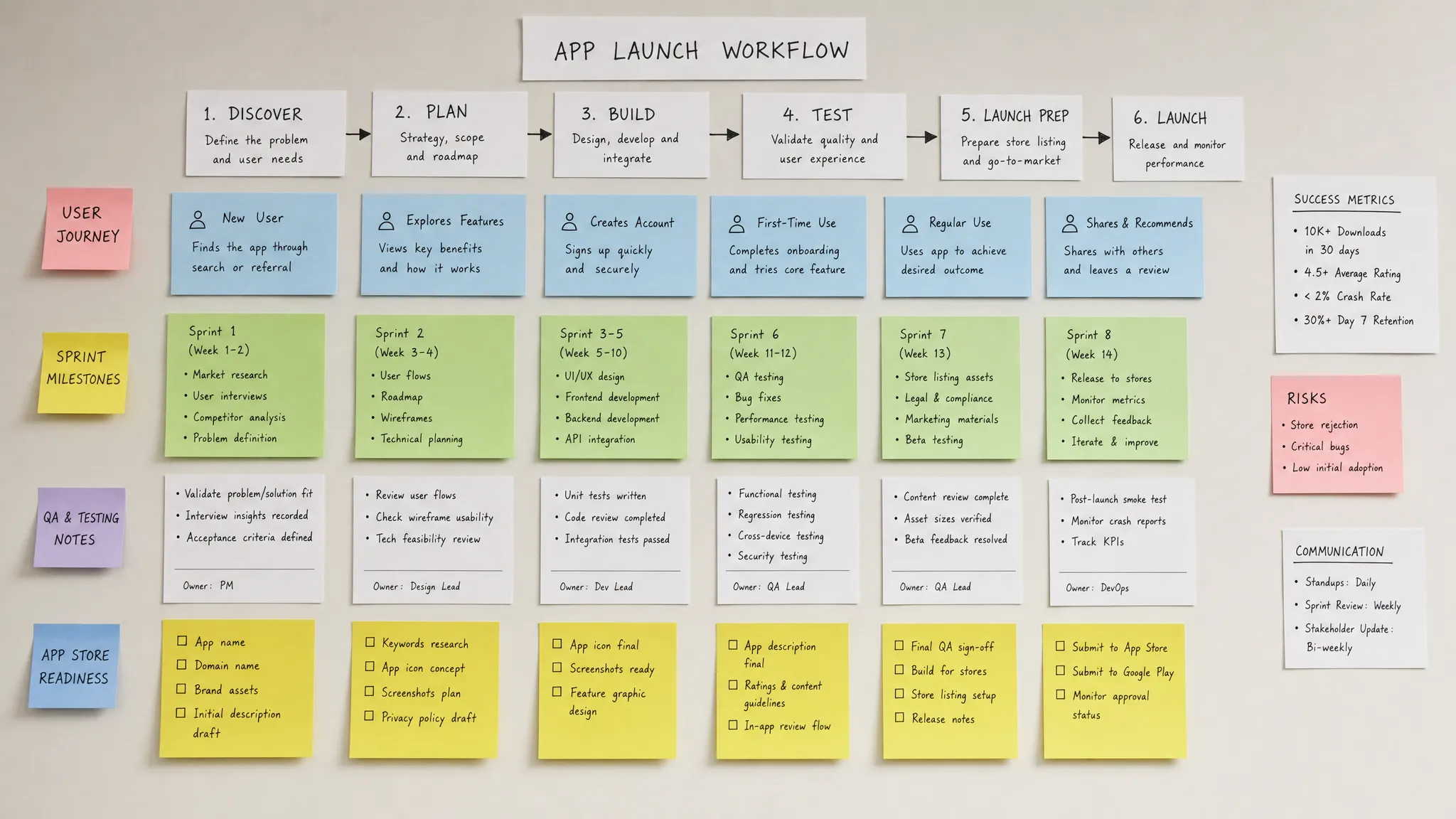
A Practical Mobile Development Workflow From Idea to Launch
The table below summarizes the workflow at a high level. The exact timing depends on scope, integrations, compliance, and team size, but the structure helps teams move faster without losing control.
| Phase | Main goal | Key outputs | How it speeds launch |
|---|---|---|---|
| Discovery and scope | Define the V1 outcome | Launch promise, user segments, success metrics, risk map | Prevents bloated scope and unclear priorities |
| UX and prototype | Validate the core journey | User flows, wireframes, prototype, acceptance criteria | Reduces rework before engineering begins |
| Architecture planning | De-risk technical decisions | Stack choice, API contracts, data model, CI/CD plan | Avoids late rebuilds and integration surprises |
| Sprint execution | Build vertical slices | Working app increments, tests, analytics events | Creates usable progress every sprint |
| Continuous QA | Catch defects early | Device matrix, test cases, regression checks | Prevents bug pileups before release |
| Beta and release prep | Validate launch readiness | TestFlight or internal testing, store assets, privacy details | Reduces review and launch-day risk |
| Staged launch | Release safely | Rollout plan, monitoring, support process | Lets the team react before issues scale |
| Post-launch iteration | Improve based on data | Fixes, retention experiments, roadmap updates | Turns launch learning into momentum |
Phase 1: Discovery That Produces Build Decisions
Discovery should not be a long strategy exercise with vague conclusions. For a funded startup, discovery should create the decisions needed to build quickly and confidently.
The most important discovery output is a focused V1 scope. That means defining the primary user, the core problem, the essential journey, and the measurable outcome that proves the app is working.
A useful discovery sprint answers questions like:
- Who is the first user segment?
- What is the primary job the app performs for them?
- What is the smallest complete loop that creates value?
- Which features are required for trust, safety, or compliance?
- Which integrations are launch-critical?
- Which assumptions need a prototype or technical spike?
- What will count as a successful first release?
This is also the right moment to identify hard constraints. If your app needs payments, background location, health data, user-generated content, AI-generated outputs, enterprise authentication, or offline sync, those decisions affect architecture and app review readiness.
Apple’s App Review Guidelines and Google Play’s app quality guidance are worth considering early because store compliance is part of product design. Permission prompts, account deletion, privacy disclosures, subscription flows, and content safety cannot be patched casually at the end.
For a deeper foundation on early planning, Appzay’s guide to mobile application development roadmaps for funded startups expands on how discovery connects to UX, architecture, and launch.
Phase 2: UX Workflows That Prevent Engineering Rework
Design is one of the biggest launch accelerators when it is done correctly. The goal is not to create beautiful screens in isolation. The goal is to create a build-ready product path.
A strong UX workflow starts with the core user loop. This is the repeatable journey that makes the app useful. For a marketplace, it might be search, request, payment, fulfillment, and review. For a productivity app, it might be capture, organize, sync, and share. For a companion app, it might be status, alert, quick action, and confirmation.
Once the loop is clear, the team maps the flow across real states:
- First-time use
- Returning use
- Empty states
- Loading states
- Error states
- Permission denied states
- Offline or weak network states
- Edge cases and recovery paths
This is where many mobile teams save weeks. A missing edge state can block engineering late in the build. A vague onboarding flow can create analytics gaps. A permission prompt shown too early can reduce activation. A payment or account deletion flow that ignores platform rules can delay approval.
Developer-ready UX should include annotated screens, component behavior, acceptance criteria, analytics events, copy notes, and platform-specific differences. When engineers can understand the intended behavior without guessing, implementation moves faster.
Phase 3: Architecture Planning Before Full Buildout
Fast launch does not mean over-engineering. It means making the hard-to-reverse decisions before they become expensive.
Architecture planning should answer how the mobile app, backend, cloud services, third-party integrations, analytics, and release systems fit together. This is especially important for apps that need real-time features, offline behavior, AI workflows, payment providers, maps, CRM sync, or background processing.
Key architecture decisions include:
- Native iOS and Android versus cross-platform
- Authentication and account model
- API contracts between mobile and backend
- Data storage and sync strategy
- Push notification model
- Analytics and event taxonomy
- Error reporting and crash monitoring
- Environment setup for development, staging, and production
- CI/CD and build signing process
- Feature flag and rollout strategy
The best workflow treats architecture as a launch enabler. API contracts allow backend and mobile teams to work in parallel. Feature flags reduce launch risk. CI/CD removes manual build chaos. Monitoring makes release decisions evidence-based.
If the stack choice is uncertain, run a short technical spike before committing. A spike can test the hardest interaction, such as camera performance, map rendering, Bluetooth connectivity, background audio, offline sync, or AI latency. A few days of focused validation can prevent months of technical debt.
Phase 4: Sprint Execution With Vertical Slices
Once scope, UX, and architecture are ready enough, sprint execution should focus on vertical slices rather than broad feature layers.
A weak sprint plan might say: “Build onboarding screens, then profile screens, then backend endpoints.” A stronger sprint plan says: “Complete the first-time user activation journey from signup to first successful action, including analytics, loading states, errors, QA, and release build.”
That second approach gives the team a usable product increment. It also reveals cross-functional issues sooner.
A typical vertical slice includes:
| Slice element | What should be included |
|---|---|
| UX | Final flow, states, copy, platform behavior |
| Mobile implementation | Screens, navigation, local state, validation |
| Backend | APIs, database changes, integrations, permissions |
| QA | Test cases, real-device checks, regression coverage |
| Analytics | Events for activation, failure, completion, retention |
| Release readiness | Build notes, feature flags, environment validation |
This is also where agile discipline matters. Sprint demos should show working software, not status slides. Product decisions should be made quickly when tradeoffs appear. Designers should stay involved during implementation to handle real constraints. QA should test inside the sprint rather than after several weeks of accumulated work.
Phase 5: Tooling and Automation That Keep the Team Moving
The right tools can accelerate a mobile development workflow, but only when they support the process. Tool sprawl can create the opposite effect, especially when decisions, assets, tickets, test cases, and release notes live in disconnected places.
At minimum, a launch-focused mobile team needs tools for product planning, UX collaboration, source control, CI/CD, crash reporting, analytics, project management, documentation, and customer support. When comparing software options, curated resources like digital tool reviews and tutorials can be useful for exploring categories, but your final choice should be based on workflow fit, security needs, integration quality, and team adoption.
The most important automation layer is CI/CD. Manual builds slow teams down and increase release risk. A strong CI/CD setup can run tests, create signed builds, distribute to internal testers, and connect versions to release notes.
For mobile teams, CI/CD should support:
- Repeatable iOS and Android builds
- Separate development, staging, and production environments
- Automated unit and integration tests where practical
- Code quality checks
- Build distribution to testers
- Version tracking tied to tickets and release notes
- Fast hotfix preparation when needed
Automation does not remove human judgment. It creates a reliable foundation so humans can focus on product quality, edge cases, and launch decisions.
Phase 6: Continuous QA and Real-Device Testing
Mobile apps fail in ways that web dashboards often do not. Network conditions change. Background behavior differs by OS. Battery constraints matter. Permission settings vary. Push notifications can be delayed or blocked. A feature that works perfectly on one device can behave poorly on another.
That is why QA must begin early. A practical QA workflow combines automated checks with focused manual testing on real devices.
For faster launches, prioritize testing around the journeys that affect activation, revenue, trust, and retention. The first user session matters. So do payment flows, account creation, data sync, onboarding, critical notifications, and any feature that depends on hardware or third-party services.
A useful device matrix does not need to cover every phone. It should cover the devices and OS versions most relevant to your target audience. For a US consumer app, that usually means recent iPhone models, at least one older supported iPhone, common Android devices, and OS versions that reflect your expected user base.
QA should also include negative paths. What happens if a user denies permissions? What if the payment provider returns an error? What if the backend is slow? What if the app is killed mid-flow? What if a user starts offline and reconnects later?
Teams that test only the happy path often launch faster in appearance, then lose time after release fixing issues that should have been caught during development.
Phase 7: Beta Testing and Store Readiness in Parallel
Beta testing should not begin after the entire app is “done.” Internal testing can start as soon as the first meaningful vertical slices exist. External beta testing should begin when the product is stable enough to produce useful feedback.
For iOS, TestFlight is commonly used to distribute beta builds. For Android, Google Play offers testing tracks that support internal, closed, and open testing workflows. These channels help teams validate behavior before a wider release.
At the same time, store readiness should move in parallel. Store assets, screenshots, descriptions, privacy disclosures, support URLs, demo accounts, reviewer notes, and compliance details all take time. Leaving them until the final week creates avoidable pressure.
A launch-ready workflow should prepare:
| Store readiness item | Why it matters |
|---|---|
| App name and positioning | Helps users and reviewers understand the product quickly |
| Screenshots and preview assets | Improves conversion and sets accurate expectations |
| Privacy disclosures | Reduces rejection risk and builds trust |
| Permission explanations | Helps users understand why access is needed |
| Demo account or reviewer notes | Makes review easier for gated apps |
| Support and legal links | Required for trust, compliance, and user help |
| App Store Optimization basics | Improves discoverability after launch |
This is also the right moment to rehearse the release. A release rehearsal validates signing, build numbers, environments, feature flags, analytics, support workflows, and rollback options before launch day.
For a focused release process, Appzay’s app deployment guide for fast, safe releases covers CI/CD, quality gates, staged rollouts, and post-release monitoring in more depth.
Phase 8: Launch With Staged Rollouts and Monitoring
A faster product launch should still be controlled. Staged rollouts give teams a way to release gradually, monitor real behavior, and respond before issues affect all users.
During launch, the workflow should shift from build mode to operations mode. The team needs clear owners for monitoring, support, bug triage, store status, marketing coordination, and executive updates.
The first 72 hours are especially important. Watch for crash spikes, API failures, onboarding drop-offs, login issues, payment failures, notification problems, store review feedback, and unexpected support tickets.
The best launch teams define thresholds in advance. For example, if crash-free sessions drop below a target, the team pauses rollout. If activation is lower than expected, product and analytics review the onboarding funnel. If support tickets cluster around one issue, engineering and support align on a fix and user-facing response.
A launch is not a finish line. It is the first real feedback loop.
A Weekly Operating Cadence for Faster Mobile Development
Even a good workflow can stall without a clear cadence. Founders and product leads should expect a rhythm that creates visibility without drowning the team in meetings.
| Cadence | Purpose | Typical participants |
|---|---|---|
| Weekly planning | Confirm sprint goals, risks, and decisions | Product, design, engineering, QA |
| Midweek risk check | Surface blockers before they cost a week | Product lead, tech lead, project lead |
| Design-engineering review | Resolve UX feasibility and edge states | Designer, mobile engineers, backend engineer |
| QA review | Confirm test coverage and regression risk | QA, engineering, product |
| Sprint demo | Show working software and decide next steps | Full team and founder stakeholders |
| Release readiness review | Validate build, monitoring, store, and support status | Product, engineering, QA, operations |
The key is not ceremony. The key is decision velocity. A fast team knows what must be decided, who owns the decision, and how it affects launch scope.
Common Workflow Mistakes That Slow Mobile Launches
The most expensive delays usually come from predictable workflow problems.
One common mistake is starting engineering before the core flow is defined. This creates false progress, because screens get built before the team understands the actual product loop.
Another mistake is treating backend, mobile, and UX as separate tracks with late integration. Mobile products depend heavily on APIs, data states, permissions, and third-party services. Integration risk should appear early in the workflow.
Teams also lose time when QA starts too late. A bug backlog near launch creates panic, weak prioritization, and rushed fixes. Continuous QA makes defects smaller and easier to resolve.
Finally, many startups underestimate App Store and Google Play readiness. Store review issues are often product and architecture issues in disguise. Privacy, payments, account deletion, permissions, content moderation, and metadata accuracy should be planned before submission.
What Founders Should Ask Their Mobile Team Every Week
You do not need to manage every technical detail to keep a mobile project moving. You do need the right visibility.
Strong weekly questions include:
- What user journey became more launch-ready this week?
- What decision is blocking speed or quality?
- Which risks are still unvalidated?
- What has been tested on real devices?
- What does the latest build prove?
- Are analytics and crash reporting working in the current build?
- What could delay store submission if we discovered it today?
- Which feature should be cut if we need to protect the launch date?
These questions keep the conversation focused on outcomes, not activity.
Frequently Asked Questions
What is a mobile development workflow? A mobile development workflow is the structured process a team uses to plan, design, build, test, release, and improve an iOS or Android app. A strong workflow connects product strategy, UX, engineering, QA, CI/CD, store readiness, and post-launch monitoring.
How does a better workflow make product launches faster? It reduces rework. Teams launch faster when scope is clear, UX is build-ready, technical risks are validated early, QA runs continuously, and releases are automated instead of handled manually at the end.
Should startups build features or vertical slices first? Vertical slices are usually better for launch speed. They prove that the user journey works end to end, including UI, backend, data, integrations, analytics, and error handling. Feature batches can hide integration issues until late in the project.
When should QA start in mobile development? QA should start as soon as there is a testable build. Early QA helps catch device-specific bugs, broken flows, weak network issues, permission problems, and regression risks before they become launch blockers.
What is the biggest workflow risk before launch? The biggest risk is often late discovery of unresolved assumptions. Examples include unclear onboarding, unstable integrations, missing privacy disclosures, payment flow issues, poor app performance, and incomplete store submission materials.
Build a Faster Launch Workflow With Appzay
A fast mobile launch is not about cutting corners. It is about building the right product system from the start: focused scope, practical UX, scalable architecture, disciplined engineering, continuous QA, CI/CD, App Store readiness, and post-launch support.
Appzay partners with funded startup founders to design, build, and launch premium iOS and Android apps end to end. If you need a technical partner who can operate like an extension of your founding team, from product strategy and UX through engineering, deployment, and maintenance, start a conversation with Appzay.