6/5/2026
Technical Mobile Decisions That Prevent Costly Rework
Make technical mobile decisions that reduce rework, from stack and architecture to integrations, QA, analytics, and launch readiness.
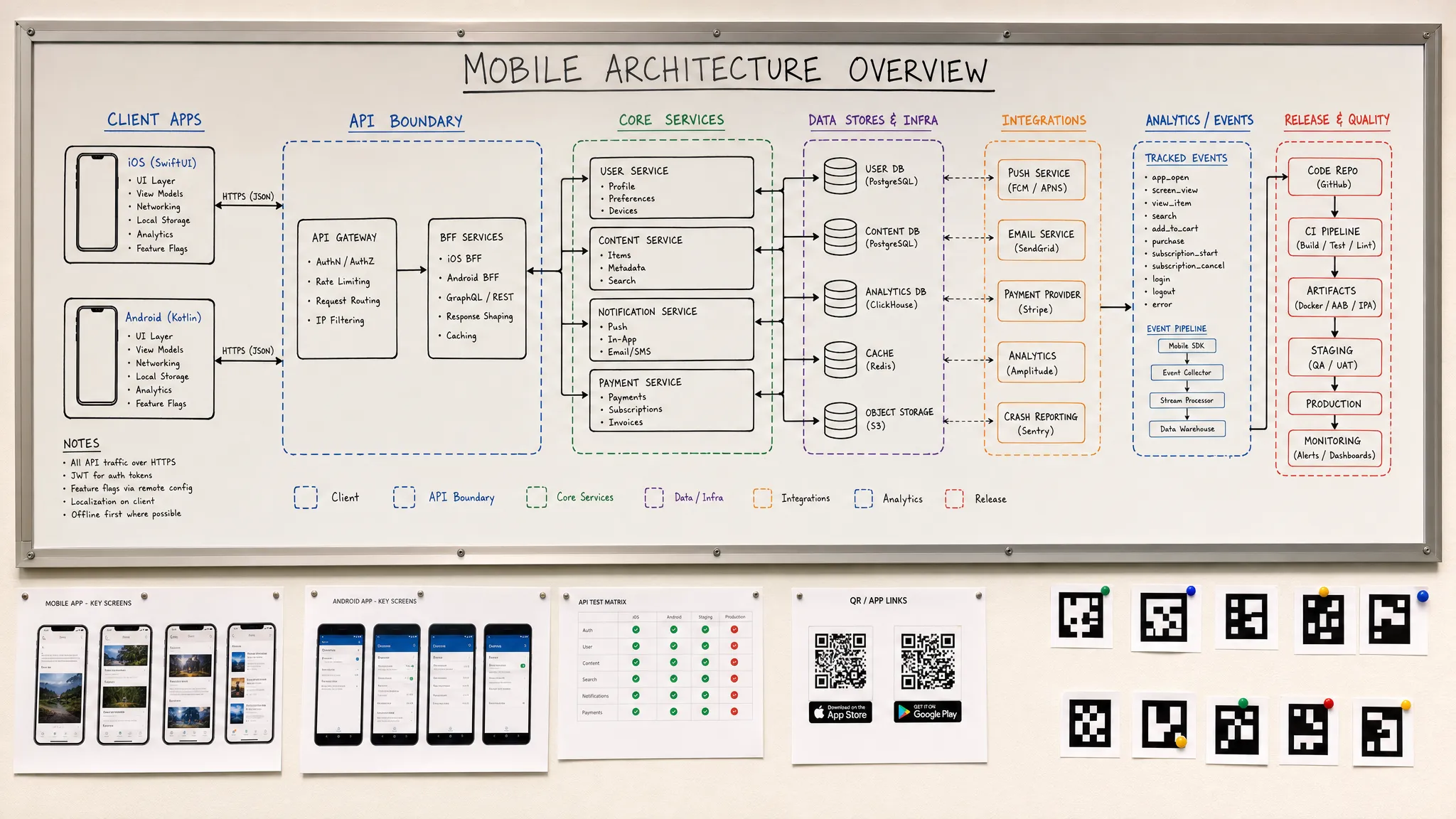
Mobile rework rarely starts with one bad sprint. It usually starts with a technical decision the team postponed until the product was already too expensive to change.
For funded startups, that creates a painful pattern: the MVP ships later, engineering velocity drops, store approval takes longer, and the first real users expose problems that were predictable months earlier. The fix is not to over-plan every future feature. It is to make the technical mobile decisions that create optionality, protect the launch, and keep the codebase flexible enough to improve after market feedback.
This guide breaks down the mobile decisions that most often prevent costly rework, from stack choice and architecture to integrations, analytics, QA, and release operations.
Rework Is Usually Decision Debt
Technical debt gets most of the blame, but decision debt is often the root cause. Decision debt happens when a team keeps building while critical assumptions remain unresolved: how offline mode works, who owns business rules, what auth model is required, how payments are handled, what data must be tracked, or how releases will be rolled out.
The problem is not uncertainty itself. Startups always operate with uncertainty. The problem is failing to separate reversible choices from choices that become expensive once screens, APIs, data models, and user expectations are built around them.
| Delayed decision | Common rework later | Better early artifact |
|---|---|---|
| Native vs cross-platform stack | Rebuilding performance-heavy features or platform-specific flows | Stack fit scorecard plus a focused technical spike |
| Backend ownership of business rules | Duplicated logic across iOS, Android, and admin tools | Domain model and API contract before implementation |
| Offline, sync, and weak-network behavior | Data conflicts, duplicate actions, broken user journeys | Sync rules, retry patterns, and edge-state UX |
| Identity, permissions, and privacy | Store review issues, onboarding redesign, data model changes | Auth, privacy, and permission plan |
| Integration architecture | Vendor lock-in, insecure secrets, brittle webhooks | Integration map with ownership, fallbacks, and test cases |
| Analytics and observability | Blind launch, unclear retention issues, slow debugging | Event taxonomy and monitoring plan tied to product metrics |
| Release process | Risky launches, manual build errors, slow hotfixes | CI/CD, environments, beta process, and rollout runbook |
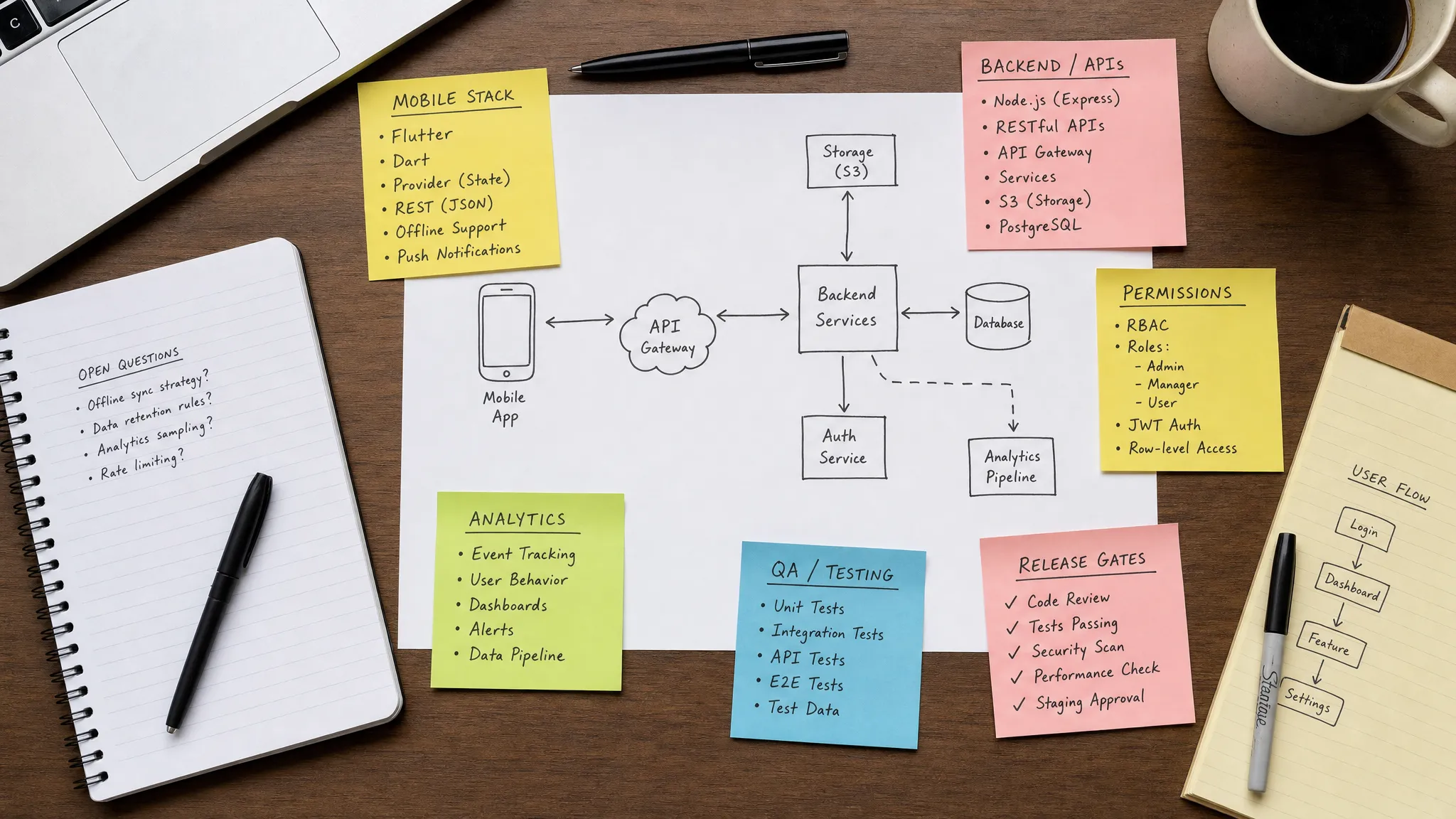
Choose the Stack Based on the Riskiest Product Interaction
The stack is the most visible technical mobile decision, but it should not be decided by trend, personal preference, or a generic cost comparison. The right question is: what is the hardest user experience your app must deliver in V1?
If the core value depends on high-performance media, background processing, Bluetooth, advanced camera behavior, intensive maps, polished platform-native interactions, or deep OS integration, native iOS and Android may reduce long-term risk. If the app is primarily form-based, content-driven, or workflow-driven, a cross-platform framework can help a team move faster without duplicating every interface.
A good stack decision considers:
- The most performance-sensitive interaction in the product
- Hardware, background, and OS-level requirements
- Expected UX polish and platform convention requirements
- Team experience and hiring realities
- Dependency risk and framework maturity
- How often product logic must be shared across platforms
- The cost of maintaining two native codebases versus one shared codebase
When the choice is unclear, do not debate it for weeks. Run a short spike. Build the riskiest interaction on representative devices, test background behavior, measure performance, confirm third-party SDK compatibility, and inspect the release pipeline. A five-day spike can save months of regret.
For a deeper comparison, Appzay has a practical guide on choosing between native app development and React Native.
Design the Architecture Around Domains, Not Screens
A common early mistake is letting screens define the architecture. That feels efficient during the first sprint because developers can quickly implement visible UI. The trouble begins when the same business concept appears in multiple places: onboarding, profile, notifications, payments, admin, and support flows all start carrying their own version of the same rules.
A more durable approach is to organize the product around domains. For example, a mobile app might have domains for identity, onboarding, content, messaging, billing, settings, and notifications. Each domain should have a clear responsibility, a consistent data model, and a predictable boundary with the backend.
This does not mean building enterprise architecture for an MVP. It means keeping business logic from leaking everywhere. UI should display state and handle interaction. Domain layers should coordinate rules. Backend services should own data integrity, permissions, and sensitive operations.
This decision prevents rework because product changes usually affect rules, not just screens. If the app needs a new onboarding requirement, billing state, user role, or access rule, a domain-based structure allows the team to change the rule in one place instead of chasing scattered conditions across the codebase.
Appzay covers this in more depth in its guide to scalable mobile app architecture patterns.
Build API Contracts for Real Mobile Conditions
Mobile apps do not run in a controlled environment. Users lose signal, switch networks, force-close apps, upgrade at different times, deny permissions, travel across time zones, and interact with stale cached data. Backend decisions that work fine for a web dashboard can create serious rework on mobile.
The API contract should be designed for the mobile reality from the start. That includes clear versioning, predictable error responses, pagination, idempotent writes, safe retries, and a plan for old app versions that remain in the wild after a backend change.
| API concern | Early decision that prevents rework |
|---|---|
| Versioning | Define how clients continue working when backend contracts evolve |
| Idempotency | Make repeated actions safe when users retry after weak-network failures |
| Pagination | Avoid performance issues from loading large datasets into mobile memory |
| Error states | Return actionable errors that the app can translate into useful UX |
| Offline behavior | Decide what can be cached, edited, queued, or blocked |
| Secrets | Keep sensitive keys and privileged operations on the backend |
| Webhooks | Design retry and reconciliation logic for payment, CRM, or notification events |
The biggest API rework usually comes from assuming the client is always online and always current. In practice, a mobile backend must serve multiple app versions, tolerate partial failure, and protect data even when the UI is interrupted.
Resolve Identity, Permissions, and Privacy Before UX Is Final
Authentication and privacy are not late-stage compliance details. They shape onboarding, database design, support workflows, App Store review readiness, and user trust.
Before engineering starts, the team should know whether the app needs email login, social login, enterprise SSO, passkeys, biometrics, anonymous sessions, role-based access, or multi-device sync. Each option affects account recovery, user data ownership, session handling, and security expectations.
Permissions need the same early attention. Camera, microphone, location, contacts, notifications, photos, Bluetooth, and health-related access all require a clear user benefit and careful timing. Asking too early can hurt activation. Asking too late can break the core flow. Asking without a credible explanation can create review risk and user distrust.
Privacy decisions should also cover account deletion, data export requirements, retention periods, analytics consent, children’s data if relevant, and how sensitive data is protected in transit and at rest. Even if the MVP is small, a weak privacy model often forces expensive redesign when the product begins selling to larger customers or entering regulated workflows.
If store compliance is a concern, review the Appzay guide to App Store and Google Play app requirements before the app is built, not during submission week.
Treat Integrations as Product Surfaces
Third-party integrations are often described as implementation details, but users experience them as part of the product. Payments that fail, maps that load slowly, CRM sync that duplicates records, push notifications that arrive out of order, or AI responses that cannot be audited all damage trust.
The integration plan should define which systems are required for V1, which can wait, and which are risky enough to validate with a prototype. For each integration, decide where secrets live, which events must be logged, how webhooks are verified, how failures are retried, and what the user sees when the vendor is unavailable.
A healthy integration architecture avoids putting vendor-specific logic everywhere. Use backend-owned secrets, wrapper services where appropriate, consistent error handling, and feature flags for risky releases. That way, replacing a provider later is still work, but it is not a full product rebuild.
If acquisition teams or outside partners will optimize campaigns after release, align the event taxonomy before launch; a partner providing managed campaign and digital marketing support will need reliable install, activation, purchase, and retention signals, not a vague dashboard added after the fact.
For product teams planning payments, maps, analytics, CRM, AI, or other services, Appzay’s mobile app integration guide outlines the decisions that reduce vendor lock-in and launch surprises.
Define Analytics Before the First Beta
Analytics added after launch rarely answers the questions founders actually care about. The team can see downloads, sessions, and a few generic screen views, but not why activation fails or which user action predicts retention.
Good analytics starts with the product model. Define the activation moment, the repeat behavior, the monetization event, and the failure points in the core journey. Then instrument events that help the team make decisions. Each event should have a clear name, trigger, owner, and privacy rationale.
For example, a marketplace app may need to know whether users complete search, view a listing, start checkout, fail payment, message a provider, and return after fulfillment. A companion app may care more about device connection, status checks, notification engagement, and quick actions. A CRM app may need to track capture speed, sync success, offline edits, and follow-up completion.
This is one of the most underrated technical mobile decisions because it affects product strategy, engineering, marketing, and support. Without trustworthy analytics, teams often rebuild flows based on opinion rather than evidence.
Build Release Engineering Before Launch Pressure Arrives
Manual mobile releases are tolerable only until the first urgent fix. After that, every missing release practice becomes expensive. Certificates, provisioning profiles, environment variables, build variants, QA builds, store metadata, and staged rollouts all create risk when handled manually under deadline pressure.
A serious mobile team should establish release engineering early. That includes CI/CD for repeatable builds, separate development and production environments, automated checks, signed builds, beta distribution, crash reporting, version tracking, and a clear release runbook.
Feature flags are especially useful for reducing rework. They let teams release code separately from exposing functionality, test risky features with smaller audiences, disable problematic flows without an emergency store submission, and coordinate backend changes more safely.
A good rollout plan also defines what happens after release. Who watches crash reports? Who owns support tickets? What metric triggers a rollback or rollout pause? How does the team compare the new version to the previous one?
For more detail, see Appzay’s guide to fast, safe mobile app deployment.
Set Performance and QA Gates Before Users Set Them for You
Users do not describe performance issues in technical terms. They say the app feels slow, drains battery, loses their work, or cannot be trusted. By the time that feedback appears in reviews, rework is already public.
Performance should be defined as part of the product promise. If the app is used in the field, weak-network behavior matters. If it is opened many times per day, cold start and battery usage matter. If users enter important data, saving, recovery, and sync confidence matter. If the app supports paid workflows, payment reliability and error handling matter.
| Area | Early gate | Rework avoided |
|---|---|---|
| Cold start and first useful screen | Define a target and measure on real devices | Late optimization of core app loading |
| Weak-network behavior | Test slow, offline, and interrupted flows | Broken journeys outside office Wi-Fi |
| Battery and background use | Measure background tasks and location behavior | OS throttling and user complaints |
| Accessibility | Test dynamic type, contrast, screen readers, and touch targets | Redesign for users and enterprise buyers |
| Data migration | Test upgrades from prior app versions | Lost data or corrupted local state |
| Store readiness | Validate permissions, payments, account flows, and metadata | Submission delays and avoidable rejection |
QA should not be a final cosmetic pass. It should be a set of release gates tied to real product risk. That means testing on actual iOS and Android devices, multiple OS versions, interrupted sessions, permission denial, app upgrades, push delivery, deep links, and backend failures.
The goal is not perfection. It is catching the class of issues that are most expensive to fix after users, investors, or reviewers have already seen them.
Know What Not to Over-Engineer
Preventing rework does not mean building every possible future state. Over-engineering can waste as much budget as under-planning. The best technical mobile decisions create a strong foundation while leaving product details flexible.
| Overbuilding trap | Leaner decision |
|---|---|
| Microservices before product fit | Start with clear domain boundaries and split services only when scale or ownership demands it |
| Large design system before flows are validated | Build a small component library around the MVP’s real screens |
| Custom infrastructure for common needs | Use mature managed services where they fit the risk profile |
| Analytics on every tap | Track events tied to activation, retention, revenue, and reliability |
| Full offline mode for every feature | Support offline behavior where it protects the core user journey |
| Premature multi-region complexity | Design data boundaries clearly, then scale when usage justifies it |
The key is to invest in decisions that are hard to change later: data model, security posture, release pipeline, integration boundaries, and architecture. Features, copy, UI polish, and secondary workflows should remain easier to change after feedback.
A Practical Decision Sequence for the First 30 Days
Teams often lose time because they debate technical choices out of order. A clearer sequence helps founders, product leads, and engineers make decisions with the right context.
- Define the V1 product promise and the one user journey that must work exceptionally well.
- Identify the riskiest mobile interaction, such as real-time sync, background recording, payments, maps, or offline capture.
- Choose the technical approach using product constraints, not assumptions about what is faster.
- Prototype or spike the riskiest interaction before committing the full build plan.
- Create a screen map and developer-ready user flows with loading, empty, error, and denied-permission states.
- Document the domain model and API contracts that support the core journey.
- Resolve authentication, privacy, permissions, and store policy implications.
- Map integrations and define failure handling, event tracking, and data ownership.
- Establish CI/CD, QA gates, monitoring, and beta distribution before the first public release.
- Review the plan against launch goals, budget, and the team’s ability to maintain the app after release.
This sequence keeps the team moving without pretending every question can be answered upfront. It simply ensures that expensive decisions are made before they become codebase-wide commitments.
Frequently Asked Questions
Should a startup optimize for speed or scalability first? Optimize for speed with scalable foundations. That means shipping a focused vertical slice, but still making durable decisions around architecture, API contracts, security, observability, and release operations. Avoid building for imaginary scale, but do not ignore choices that are expensive to reverse.
When is native mobile worth the extra investment? Native iOS and Android are often worth it when the core product depends on high performance, deep OS features, hardware access, advanced background behavior, premium platform-specific UX, or strict reliability requirements. If the app is workflow-heavy and not deeply platform-specific, cross-platform may be a better starting point.
Can we change the mobile stack later if the first choice is wrong? Yes, but it is rarely cheap. A stack change can affect UI, navigation, state management, native modules, tests, CI/CD, hiring, and release timelines. If the choice is uncertain, run a short technical spike before committing the full roadmap.
Which technical decisions should be made before hiring an app agency? Founders should clarify the business goal, target users, core journey, budget range, launch timing, must-have integrations, and known constraints. A strong agency can help refine the stack, architecture, UX, and release plan, but it needs enough context to make responsible recommendations.
How does Appzay help reduce rework? Appzay partners with founders from concept to App Store, combining product strategy, UX design, native iOS and Android engineering, cloud integration, CI/CD, release orchestration, App Store optimization, and proactive support. The goal is to make the right technical decisions early so the product can launch smoothly and improve confidently.
Build Once, Then Improve With Confidence
Costly rework is not inevitable. It is usually the result of technical mobile decisions made too late, made in isolation, or made without understanding the product’s real constraints.
If you are building a funded mobile MVP, the strongest path is to align product strategy, UX, architecture, engineering, QA, and launch operations before code becomes expensive to change. That does not slow the team down. It gives every sprint a clearer target.
Appzay helps founders design, build, launch, and support premium iOS and Android apps end to end. If you want a technical partner that can turn your concept into a scalable, store-ready product, talk to Appzay about your mobile roadmap.