5/12/2026
The Founder's Roadmap From App Idea to Launch
Build mobile application from idea to MVP to App Store with a practical roadmap for validation, UX, engineering, testing, and launch.

A strong app does not begin with a sprint backlog. It begins with a clear business bet: a specific user has a painful problem, a mobile experience can solve it better than the alternatives, and a focused first release can prove that enough people care.
For funded startups, the challenge is rarely “can we build this?” The harder question is “what should we build first so we learn fast, look credible, and avoid wasting runway?” This guide walks through the practical path to build a mobile application, from idea validation to MVP execution to App Store launch, with the decisions founders should make before, during, and after development.
The three-stage path from idea to App Store
Think of your app journey as three connected stages. Each stage should reduce a different type of risk.
| Stage | Main question | What you should prove | Key output |
|---|---|---|---|
| Idea | Is this worth building? | A real audience has a painful, frequent problem | Product thesis, target user, validation evidence |
| MVP | Can the product create value? | A narrow user loop works well enough to drive behavior | Usable iOS and Android build with instrumentation |
| App Store | Can we launch safely and learn? | The app meets platform, privacy, quality, and positioning requirements | Approved release, analytics, support process, launch plan |
Skipping a stage usually creates rework later. If you rush from idea to engineering without validation, you may build features users do not want. If you rush from MVP to App Store without compliance and quality work, you may face review delays, poor retention, or damaging first reviews.
Start with a product thesis, not a feature list
A feature list feels productive, but it often hides weak strategy. Before you define screens, write a concise product thesis that explains who the app serves, what urgent problem it solves, and why mobile is the right channel.
A useful thesis sounds like this: “For independent fitness coaches who lose clients between sessions, we are building a mobile coaching app that helps them send workouts, track accountability, and respond quickly, so clients stay engaged and coaches retain more revenue.”
That statement gives your team something concrete to evaluate. It identifies the customer, the pain, the behavior change, and the business outcome. It also keeps the MVP from becoming a collection of unrelated ideas.
Your early strategy should answer five questions:
- Who is the first narrow audience?
- What problem are they already trying to solve?
- Why does this need to live on a phone?
- What action should users repeat weekly or daily?
- What metric proves the product is working?
If you cannot answer those questions, you are not ready for full development. You may be ready for research, prototyping, or a technical spike, but not for a production build.
Validate demand before you commit engineering budget
Validation does not mean asking friends if they “like the idea.” It means testing whether your target users will trade something meaningful, such as time, money, data, or workflow change, for the promised outcome.
For most startup apps, the best validation methods are lightweight but specific. Founder-led customer interviews help uncover the exact language users use to describe the problem. Competitor review mining can reveal what existing products fail to solve. A clickable prototype can test whether users understand the flow before engineers write production code. A landing page or waitlist can test whether the positioning creates interest.
If the product has technical uncertainty, validate feasibility early. Examples include Bluetooth reliability, low-latency audio, AI inference, real-time collaboration, offline sync, payments, geolocation, or heavy media processing. A one-week technical spike can prevent months of false confidence.
For a deeper validation process, see Appzay’s guide to app market research before you build.
Scope the MVP around one complete user loop
An MVP is not the cheapest possible version of your dream product. It is the smallest credible product that lets users complete the core loop and lets your team measure whether that loop matters.
A core loop is the repeatable sequence that creates value. For a marketplace, it might be search, request, match, transact, review. For a wellness app, it might be onboard, receive plan, complete habit, track progress, get feedback. For a B2B field app, it might be capture data, sync to backend, notify team, resolve task.
The MVP should feel narrow, not broken. Users should be able to complete the main journey without running into placeholders, confusing dead ends, or missing trust signals.
| Include in the MVP | Usually postpone |
|---|---|
| Core onboarding and account flow | Advanced personalization |
| Main user action and success state | Secondary social features |
| Essential notifications or reminders | Complex gamification |
| Analytics for activation and retention | Full admin automation if manual ops can work briefly |
| Security, privacy, and store-compliant flows | Nice-to-have settings and theme options |
| Basic support and feedback path | Multi-market localization unless required |
The hardest MVP decisions are not technical. They are product trade-offs. Every feature should earn its place by helping prove the business bet, reducing a major risk, or creating enough trust for users to engage.
For a focused scoping model, read Appzay’s guide to building the leanest mobile app MVP that can still win.
Choose the right technical approach for your roadmap
Your technology choice should follow the product’s constraints, not developer preference. Native iOS and Android, React Native, Flutter, and hybrid approaches can all be the right answer in different situations.
Native development is often the stronger choice when your app depends on premium platform polish, device APIs, performance-sensitive interactions, background processing, health data, camera workflows, Bluetooth, or tight Apple and Google ecosystem integration. Cross-platform development can be a strong fit when the product needs to launch on both platforms quickly, shares most business logic across platforms, and does not depend heavily on platform-specific behavior.
The backend matters just as much as the mobile stack. Even simple apps often need authentication, data models, APIs, push notifications, analytics, file storage, payment handling, admin workflows, and security controls. If you expect growth, design for clean API contracts, observability, CI/CD, and maintainable release processes from the beginning.
| Product need | Technical implication |
|---|---|
| Fast two-platform MVP | Consider React Native, Flutter, or a carefully scoped shared approach |
| Heavy device integration | Native iOS and Android may reduce long-term risk |
| Real-time collaboration | Plan backend architecture, presence, sync, and conflict handling early |
| Offline usage | Design local storage, sync rules, and retry behavior before UI polish |
| Regulated or sensitive data | Prioritize privacy, permissions, security, and auditability |
| AI-powered features | Plan latency, cost control, data handling, fallback states, and user trust |
If the choice is unclear, run a technical spike against the riskiest interaction. Build a small proof, measure it on real devices, and evaluate developer velocity. That is usually more reliable than debating frameworks abstractly.
Turn the idea into developer-ready UX
Great mobile UX is not just beautiful screens. It is a set of decisions about behavior, state, priority, and trust. Before production development, your team should understand what happens when a user is new, returning, offline, denied a permission, waiting for a network response, entering invalid data, or recovering from an error.
Wireframes should map the main journey and major edge cases. Interactive prototypes should let stakeholders feel the flow before code is written. Design systems should define reusable components, typography, spacing, color usage, forms, buttons, loading states, empty states, and accessibility expectations.
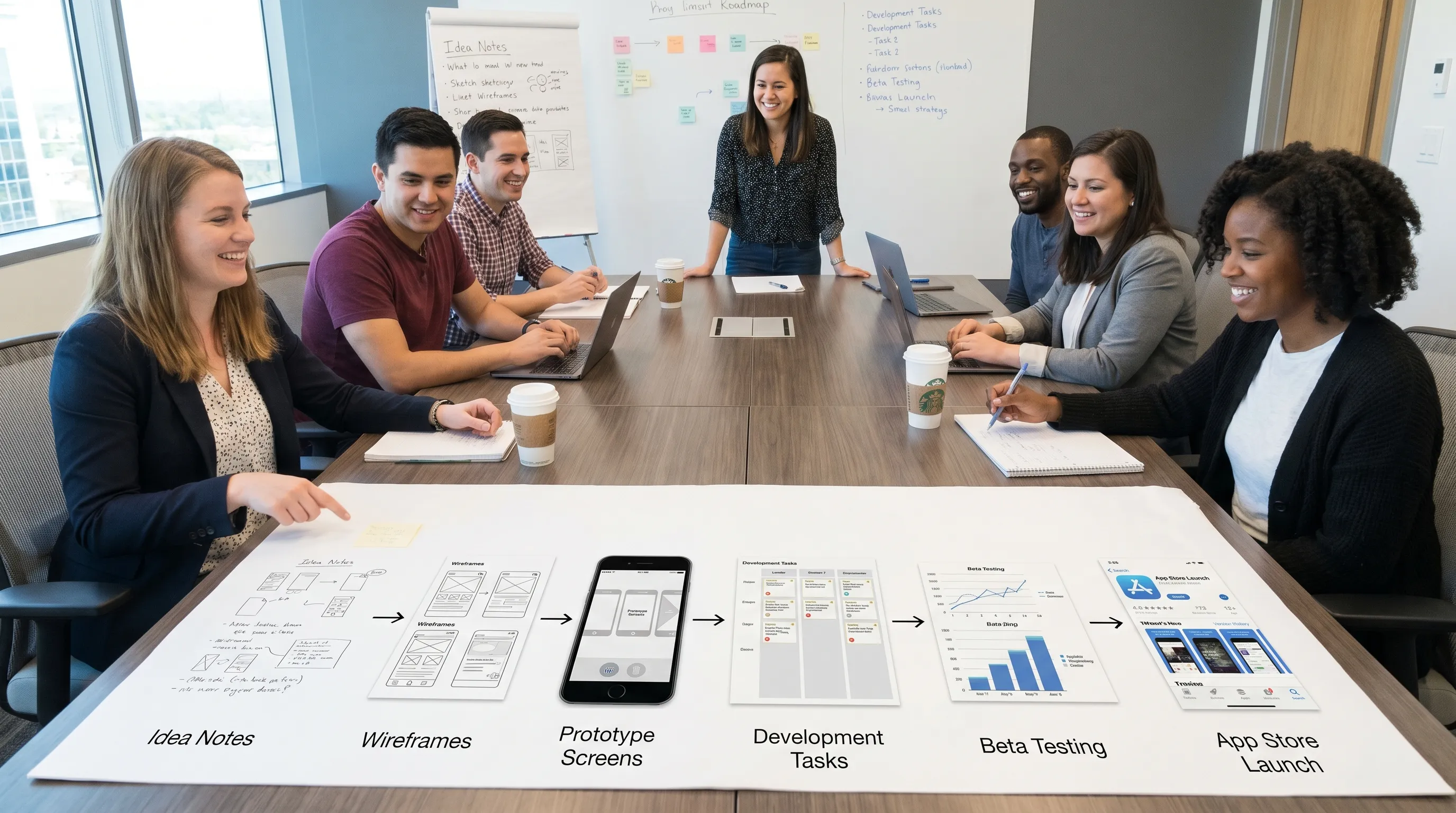
This is where many apps save or lose weeks. If a screen looks clear in a static mockup but has no defined error state, permission state, or loading state, engineers must make product decisions mid-build. That slows delivery and creates inconsistent experiences.
A developer-ready UX package should include the screen map, clickable prototype, component library, state annotations, acceptance criteria, analytics events, and known trade-offs. The goal is not perfect documentation. The goal is shared understanding.
Build with release quality from the first sprint
A mobile MVP should move fast, but it should not be disposable by default. If the app succeeds, your next problem will be scaling usage, adding features, onboarding team members, and shipping updates safely. A rushed codebase makes every future win more expensive.
Release-quality engineering includes clear architecture, automated tests where they matter, code review, CI/CD, crash reporting, environment management, analytics, feature flags where useful, and secure handling of secrets and user data. It also means testing on real devices, not only simulators.
For funded startups, the right level of engineering discipline is pragmatic. You do not need enterprise bureaucracy in your first release, but you do need enough structure to avoid fragile launches. A good development partner should help you distinguish between healthy foundations and premature complexity.
At Appzay, this is where end-to-end mobile development becomes valuable. Product strategy, UX, native iOS and Android engineering, distributed systems architecture, CI/CD, App Store optimization, and maintenance are connected parts of one launch system rather than separate handoffs.
Instrument the app before you launch
If you launch without analytics, you are flying blind. Instrumentation should be part of MVP scope, not an afterthought.
At minimum, define events that show whether users reach the core value moment. Track install source, account creation, onboarding completion, first key action, repeat key action, purchase or subscription behavior if relevant, notification opt-in, major errors, and retention cohorts.
Do not track everything just because you can. Too many events create noise. Instead, build a measurement plan around the questions you will need to answer after launch.
For example, if users install but do not activate, you need onboarding and first-action data. If users activate but do not return, you need retention, notification, and value-loop data. If users return but do not pay, you need pricing, packaging, and conversion data.
Good analytics also protects your roadmap. Without behavioral evidence, product discussions become opinion contests. With clear data, you can prioritize fixes, onboarding improvements, and new features based on observed friction.
Prepare for App Store and Google Play review early
Store submission is not a final administrative step. It affects product decisions throughout development.
Apple and Google care about privacy, permissions, payments, account flows, content safety, metadata accuracy, technical stability, and policy compliance. Reviewers need to understand what your app does, how to access test accounts, why permissions are requested, and whether your listing matches the actual product.
Before submission, review the official Apple App Review Guidelines and Google Play Developer Policy Center. These policies change over time, so treat compliance as an ongoing responsibility.
Common review blockers include vague permission prompts, broken login flows, missing account deletion, misleading screenshots, incorrect privacy disclosures, improper payment routing for digital goods, unstable builds, and apps that appear unfinished. If your app uses user-generated content, AI, health data, financial data, location, children’s data, or subscriptions, give review readiness even more attention.
A strong submission packet usually includes test credentials, reviewer notes, demo instructions, support contact, privacy policy, terms if needed, accurate app metadata, screenshots, age rating answers, permission explanations, and a clear description of any restricted flows.
For more detail, Appzay has a focused App Store submission checklist that helps teams catch common rejection risks before review.
Plan launch as a learning system, not a single event
Getting approved is not the finish line. It is the start of public learning.
Your launch plan should cover acquisition, onboarding, support, app store optimization, feedback collection, monitoring, and your first two or three update cycles. The first public users will reveal friction that prototypes and beta testers missed. Your team should be ready to respond quickly.
App Store optimization matters because your listing sets expectations before users install. Screenshots should communicate the core value, not just display UI. The first lines of the description should make the product’s promise obvious. Keywords and category choices should reflect how real users search. Ratings and reviews should be monitored from day one.
Growth work can also begin before launch. If you are preparing email campaigns, ad creative, or social assets, an AI-powered marketing workflow such as Needle’s platform for ecommerce marketing campaigns can be useful for teams that need to produce and test launch assets without adding unnecessary agency overhead.
The key is to connect marketing to product learning. Acquisition is only useful if you can see what users do after they arrive. A successful launch is not just more downloads. It is more qualified users reaching the value moment and returning.
A realistic timeline to build a mobile application
Every app is different, but funded startups often underestimate the time required for decisions, testing, and review preparation. The range below assumes a focused MVP, a responsive founder team, and an experienced mobile team.
| Phase | Typical duration | Main deliverables |
|---|---|---|
| Validation and product thesis | 1 to 3 weeks | Audience, problem, value proposition, evidence, success metric |
| Discovery and UX prototype | 2 to 4 weeks | Scope, user flows, prototype, technical plan, release roadmap |
| MVP engineering | 6 to 12 weeks | iOS and Android app, backend, integrations, analytics, QA builds |
| Beta and store readiness | 1 to 3 weeks | TestFlight or internal testing, bug fixes, metadata, review packet |
| Launch and iteration | Ongoing | Approved release, monitoring, support, retention improvements |
Complex integrations, compliance requirements, hardware dependencies, AI workloads, marketplace mechanics, or real-time collaboration can extend this timeline. The better approach is not to force an unrealistic deadline. It is to narrow the MVP until the deadline and the quality bar can coexist.
What to prepare before hiring a mobile app development partner
If you plan to work with an agency or technical partner, preparation makes the engagement faster and more predictable. You do not need a complete specification, but you should bring clarity about the business goal.
Useful preparation includes a one-page product brief, target audience, competitor notes, validation evidence, desired platforms, must-have integrations, brand assets if available, launch deadline, budget range, and decision-maker availability. If you have wireframes or a prototype, include them. If you have only an idea, expect discovery to be the first paid step.
When evaluating partners, look for evidence of product thinking and release ownership, not just attractive portfolios. Ask how they scope MVPs, handle technical risk, test on devices, manage CI/CD, prepare store submissions, document decisions, and support apps after launch.
The best partner should be able to challenge your assumptions respectfully. If a team simply says yes to every feature, they may be optimizing for contract size instead of launch success.
Common mistakes that slow founders down
Many mobile app delays come from predictable mistakes. The good news is that most are avoidable with the right process.
One common mistake is building for too many audiences at once. A broad first release often feels strategic, but it usually creates vague onboarding, bloated scope, and weak retention. Start with the audience most likely to feel the problem intensely.
Another mistake is treating design as decoration. Visual polish matters, especially for premium apps, but UX decisions about permissions, empty states, errors, and repeat usage matter just as much.
A third mistake is underestimating store readiness. Privacy policies, permission wording, account deletion, subscription rules, and metadata should not be assembled at midnight before submission.
Finally, many teams postpone maintenance planning. Mobile operating systems change, dependencies age, app store policies evolve, and user expectations rise. If the app matters to your business, budget for proactive maintenance and iteration after launch.
Frequently Asked Questions
How much should I validate before I build a mobile application? Validate enough to prove that a specific audience has the problem, understands your proposed solution, and is willing to take a meaningful action. That action might be joining a waitlist, paying for early access, using a prototype, or changing an existing workflow.
Should my MVP launch on both iOS and Android? It depends on your audience and go-to-market plan. If your early users are concentrated on one platform, a single-platform MVP may be faster. If your market expects both platforms or your sales motion requires them, plan a two-platform build from the start.
Is React Native or native development better for an MVP? Neither is universally better. React Native can be efficient for many two-platform MVPs, while native development may be better for performance-sensitive, hardware-heavy, or premium platform-specific experiences. Choose based on product constraints and roadmap risk.
What is the difference between a prototype and an MVP? A prototype demonstrates the flow and helps test understanding before production code. An MVP is a working product that real users can use to complete the core loop and generate behavioral data.
How long does App Store approval take? Review times vary by platform, app complexity, policy category, and whether reviewers find issues. The best way to reduce delays is to submit a stable build with accurate metadata, clear privacy disclosures, complete test credentials, and reviewer notes.
What happens after the first launch? After launch, your team should monitor crashes, analytics, reviews, support tickets, onboarding drop-off, activation, and retention. The first updates should focus on stability, clarity, and the biggest friction points in the core user loop.
Build your app with a launch-ready team
If you are a funded founder ready to move from idea to MVP to App Store, the right process can save months of rework. You need more than code. You need product strategy, UX clarity, mobile engineering, backend architecture, testing, release orchestration, store readiness, and post-launch support working together.
Appzay partners with founders to design, build, and launch premium iOS and Android apps end-to-end. If you want a technical team that can help shape the product and ship it with confidence, talk to Appzay about your mobile application idea.