4/26/2026
Custom Mobile App Development: Scoping Features the Smart Way
Learn how to scope features for custom mobile app development: prioritize outcomes, cut risk, and define an MVP that ships on time and budget.

Feature scope is where most mobile products win or lose. Scope too big, and you burn runway on edge cases and polish nobody sees. Scope too small or too vague, and you ship something that technically “works” but cannot retain users, pass store review smoothly, or support your next iteration.
In custom mobile app development, smart scoping is less about creating a massive checklist and more about choosing the smallest set of capabilities that reliably delivers value, with clear trade-offs and measurable outcomes.
Start with outcomes, not features
Before you debate “should we include X,” get crisp on what success means for the next release.
Define the primary job and the moment of value
A good scope is anchored to one primary job and one moment where the user feels the product “clicked.” If you cannot name that moment, you will keep adding features to compensate for uncertainty.
Useful prompts:
- What is the first meaningful outcome a user wants in their first session?
- What do we want the user to be able to do in under 60 seconds?
- What would make a user come back within 24 hours?
Choose 1 to 3 measurable success metrics
Avoid vanity metrics and pick a few indicators that reflect real progress.
Examples:
- Activation rate (user reaches the “moment of value”)
- Week-1 retention
- Task completion rate for the core flow
- Conversion to trial or purchase (if relevant)
These metrics become your scope filter: if a feature does not improve a chosen metric or reduce a critical risk, it probably does not belong in the first build.
Capture constraints early (so they do not ambush your scope)
Constraints are not blockers, they are design inputs. The earlier you set them, the fewer “surprise” features you discover mid-build.
Common constraints that directly change feature scope:
- Timeline and launch window (investor update, partnership, event)
- Platform strategy (iOS first, Android first, or both)
- Compliance and policy requirements (privacy disclosures, subscriptions, content rules)
- Backend readiness (existing APIs vs new systems)
- Team operational maturity (support, on-call, QA, release cadence)
A scope that ignores constraints becomes a re-scope later, usually when it is most expensive.
Build a feature inventory that is structured, not a brainstorm dump
Most teams start with a list. Strong teams start with a flow.
Map the end-to-end user journey
Write the simplest journey from entry point to outcome:
- Acquisition entry (invite link, app store search, QR code)
- Onboarding and permissions
- Core action
- Feedback loop (status, history, confirmation)
- Return loop (notifications, reminders, saved items)
Then ask: what is the minimum needed to make that journey reliable?
Convert ideas into “capability slices”
Instead of scoping “Chat,” “Payments,” or “Profiles” as single items, split them into slices you can ship.
Example (payments):
- Show pricing and plan selection
- Start a trial
- Purchase subscription
- Restore purchases
- Handle billing issues and entitlement refresh
This prevents the most common scoping illusion: treating a big system as one checkbox.
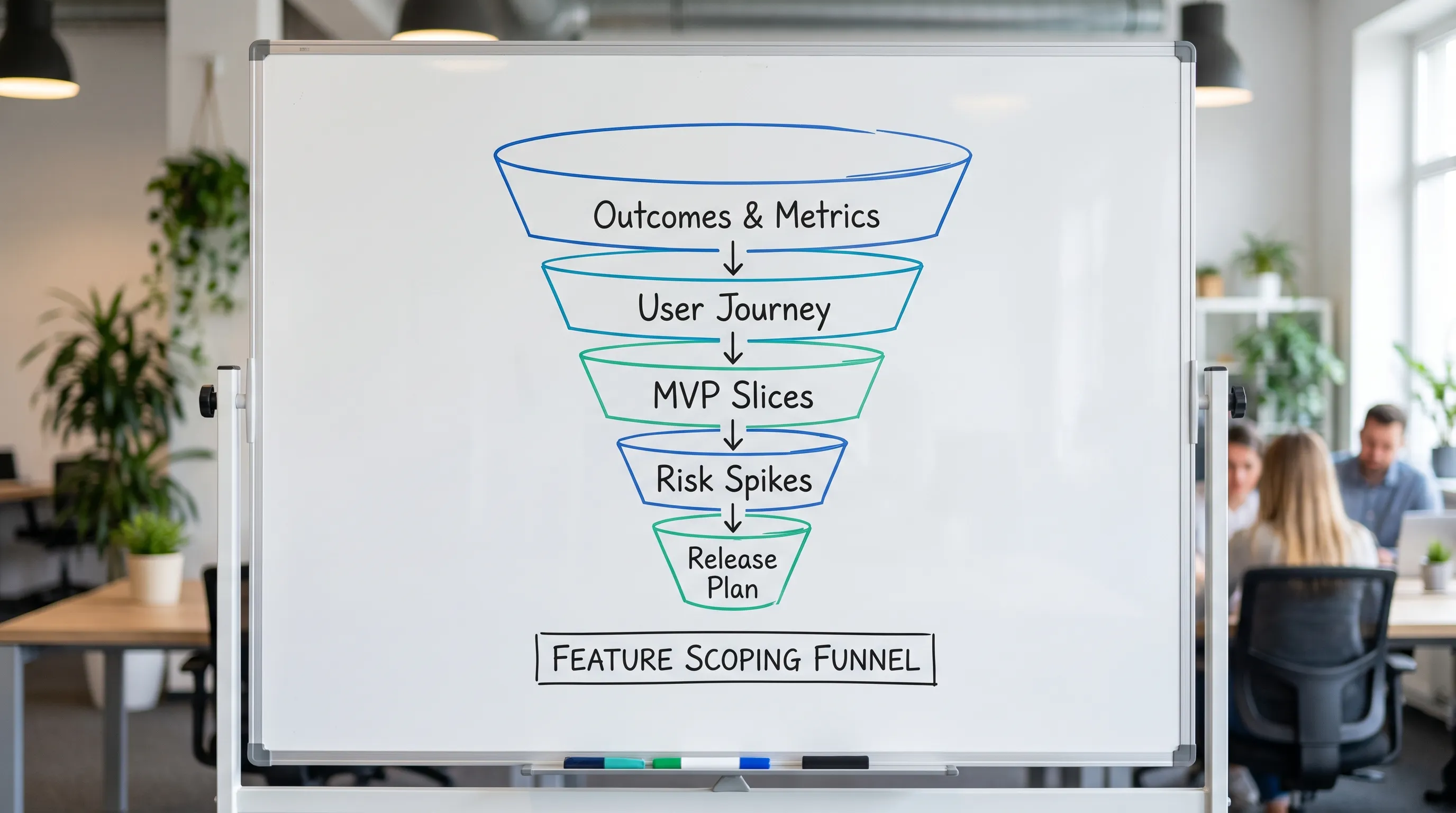
Prioritize with a scoring rubric your team will actually use
You do not need a perfect framework. You need a consistent one.
A practical approach is to score each capability slice across a few dimensions, then discuss the exceptions.
| Dimension | What you are judging | Typical question | Score guidance |
|---|---|---|---|
| User value | Direct impact on the primary job | Does it help the core user succeed faster? | 1 (nice) to 5 (essential) |
| Business value | Impact on revenue or strategic goals | Does it unlock monetization or a key partnership? | 1 to 5 |
| Risk reduction | Unknowns eliminated by building it | Does it de-risk policy, security, or technical feasibility? | 1 to 5 |
| Effort | Cost in design + engineering + QA | How big is the slice end-to-end? | 1 (small) to 5 (large) |
Then compute a simple priority signal:
- Priority = (User value + Business value + Risk reduction) / Effort
This is not math for math’s sake. It is a forcing function that makes trade-offs visible.
Scope the MVP as a “thin, end-to-end” product, not a pile of partial features
An MVP that converts and retains is usually a vertical slice across the full system.
A common mistake is building horizontal layers first (all screens, then all APIs, then polish). Instead, ship the thinnest version of the complete loop:
- The user can enter
- Do the core job
- See the result
- Return and repeat
That loop also drives better quality engineering because you are testing real interactions, not isolated components.
MVP vs V1 vs V1.1
Teams often overload “MVP.” Clarify these tiers:
| Release tier | What it is | What it is not |
|---|---|---|
| MVP | First shippable loop that proves value and feasibility | A demo prototype, or a feature-complete product |
| V1 | MVP plus the minimum “trust and usability” layer | A giant backlog “wishlist” |
| V1.1 | Fast follow improvements based on real usage | A rewrite to fix preventable scope mistakes |
This framing makes it easier to cut features without feeling like you are “lowering quality.” You are sequencing value.
Write feature scope in a way engineering and design can execute
A scope doc that reads like a pitch deck creates ambiguity, and ambiguity creates rework.
Use a one-page “Feature Brief” template
For each feature or capability slice, capture:
- Purpose: the user problem it solves
- In-scope: what is included
- Out-of-scope: explicit non-goals
- Acceptance criteria: what must be true for “done”
- Edge cases: only the important ones
- Analytics: what event(s) prove it works
Define “done” beyond UI
Especially for mobile, “done” should include non-visual requirements.
Examples of scope that should be explicit:
- Offline behavior (what happens with no connection)
- Loading and empty states
- Error handling (recoverable vs blocking)
- Accessibility baseline (dynamic type, contrast)
- Performance expectations for key screens
These are not “nice to have.” They decide whether users trust the product.
De-risk the scary parts with spikes and prototypes
Smart scoping includes planned learning.
Run time-boxed spikes for unknowns
A spike is a short technical investigation that answers one question.
Good spike questions:
- Can we meet latency targets on a key screen?
- Will the OS allow this background behavior?
- Can we integrate this third-party SDK without policy issues?
- Can we safely store or process this data under our privacy constraints?
Time-box spikes tightly and convert the outcome into scope decisions.
Prototype interactions that drive adoption
If the product depends on a specific behavior (for example, habit-forming daily usage, guided flows, or complex forms), interactive prototypes can validate the loop before full implementation.
This is especially useful when there are many surfaces to coordinate, such as a relocation or housing experience that spans discovery, booking, legal checks, and post-move services. A platform like the Movely long-term rental and home services platform is a good example of a domain where scoping thin slices (search, shortlist, verification, support) matters more than trying to ship every possible feature at once.
Watch for “scope multipliers” that quietly double your build
Some features look small until you count what they require across design, backend, QA, and store compliance.
Common scope multipliers:
- Accounts and identity (passwordless, SSO, social login, recovery)
- Roles and permissions (admin, user, moderator)
- Notifications (opt-in rates, copy, timing rules, deep links)
- User-generated content (moderation, reporting, policy compliance)
- Payments and subscriptions (entitlements, restore, failed billing, refunds)
- Internationalization (time zones, currencies, locale formatting)
A smart scope does not avoid these forever. It sequences them when they become necessary.
Make room for App Store and Play Store realities
Feature scope is not only a product decision, it is also a distribution decision.
Even in early versions, you should scope time and effort for:
- Permission prompts that match actual behavior
- Privacy disclosures and data collection transparency
- Stable performance (crashes and hangs are launch killers)
- Accurate metadata and in-app flows that match the listing
If you treat store compliance as “post-dev paperwork,” you will pay for it in delays and rework.
Turn scope into a delivery plan you can defend
Once prioritized, translate scope into a plan with explicit trade-offs.
A practical planning structure:
- Release goal and metrics
- MVP slices (must ship)
- Quality bar (testing, performance, accessibility baseline)
- De-risk items (spikes) and their exit criteria
- “Not now” list (documented and agreed)
Use a scope gate before implementation starts
Hold a short scope gate meeting where you confirm:
- The app’s core loop is complete on paper
- Each slice has acceptance criteria
- High-risk items have spikes scheduled
- The “not now” list is real and owned
This one meeting prevents weeks of churn.
What to expect from a professional scoping process (agency or in-house)
Whether you work with an agency or build internally, scoping should produce concrete artifacts that reduce delivery risk.
| Artifact | Why it matters | What “good” looks like |
|---|---|---|
| MVP interaction map | Aligns everyone on the core loop | One flow that a user can complete end-to-end |
| UX prototype | Exposes usability gaps early | Clickable, realistic states, not just static screens |
| Technical plan | Prevents architecture thrash | Key decisions documented, unknowns flagged |
| Backlog with slices | Makes scope executable | Thin slices with acceptance criteria |
| Release plan | Makes launch predictable | Beta, store submission readiness, rollout approach |
If you cannot point to these outputs, your “scope” is probably still a brainstorm.
Frequently Asked Questions
How do I scope an MVP for custom mobile app development without shipping something “cheap”? Ship a complete end-to-end loop, then add quality essentials (error handling, performance, accessibility). Cut breadth, not trust.
What is the biggest scoping mistake founders make? Treating large systems (auth, payments, notifications) as single features. Always scope them as slices that can ship.
Should we scope iOS and Android at the same time? Often yes for product consistency, but not always for execution. Decide whether you need simultaneous launch or a staged rollout based on timeline, budget, and risk.
How detailed should acceptance criteria be? Detailed enough that design, engineering, and QA agree on “done,” including edge cases that affect trust (offline, errors, empty states), without listing every hypothetical scenario.
When should we do prototypes vs technical spikes? Prototype when the risk is user behavior or UX clarity. Spike when the risk is feasibility, performance, platform limitations, or third-party integrations.
Build a smarter scope, then ship with confidence
If you are planning a funded build and want scope that is tight, defensible, and engineered for a smooth launch, Appzay can help you define the MVP slices, de-risk the hard parts, and deliver end-to-end from concept to App Store.
Explore Appzay’s approach at appzay.com.