6/7/2026
Architecture App Decisions That Make Scaling Easier
Learn the architecture app decisions that help mobile startups scale cleanly, avoid rewrites, and launch stronger iOS and Android products.
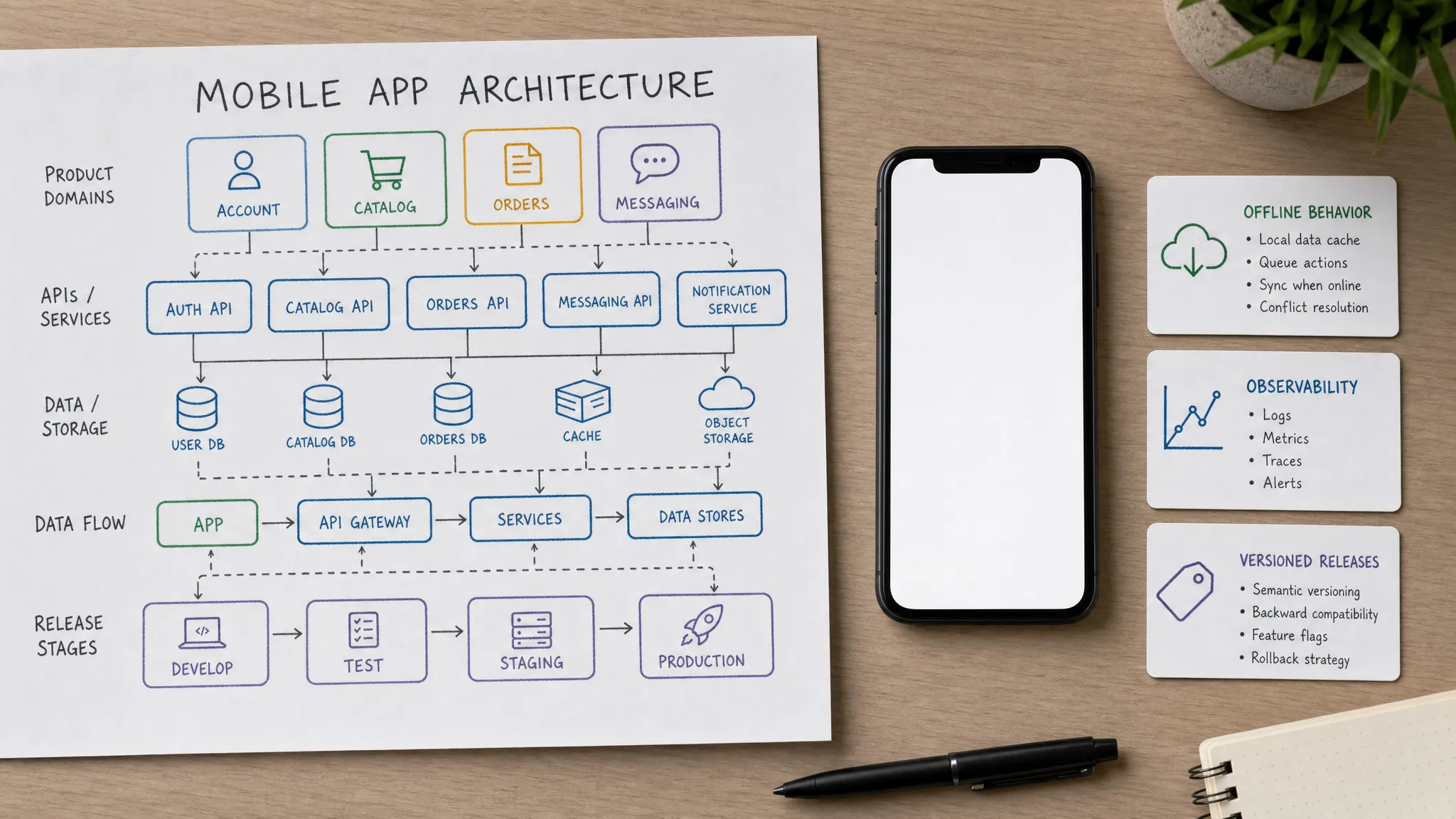
Scaling problems rarely start as a single dramatic outage. They usually arrive as small, compounding frictions: a new feature takes twice as long as expected, one integration breaks three screens, support cannot explain inconsistent data, or a launch spike exposes assumptions nobody documented.
For funded startups, the best architecture app decisions are not the most complex ones. They are the decisions that let your team add features, change business rules, support more users, and ship updates without turning every sprint into a rewrite.
In 2026, mobile products often need to handle subscriptions, AI workflows, cloud sync, privacy requirements, real-time updates, and multiple release channels from day one. That does not mean your MVP needs enterprise architecture. It means your architecture should make future change cheaper, safer, and more visible.
Scaling is not only about traffic
When founders think about scaling, they often picture servers handling more users. That matters, but it is only one part of the problem. A mobile app also needs to scale across product complexity, engineering collaboration, integrations, support, and release operations.
An app can fail to scale even with low traffic if the architecture makes every change risky. A clean architecture helps the team answer a simple question: can we change one part of the system without surprising the rest of it?
| Scaling dimension | Architectural question | Common early shortcut that hurts later |
|---|---|---|
| Usage scale | Can APIs, data storage, and background jobs handle spikes? | Putting all work into synchronous user requests |
| Product scale | Can the team add features without touching every screen? | Mixing business rules directly into UI components |
| Team scale | Can engineers work in parallel with clear ownership? | No module boundaries or shared coding conventions |
| Integration scale | Can vendors be added or replaced safely? | Calling third-party services directly from the app |
| Release scale | Can updates ship safely and be monitored? | Manual builds, no staged rollout plan, no versioned backend behavior |
| Data scale | Can the data model evolve as the business changes? | Unclear identifiers, weak migration planning, and one-off data fields |
The goal is not to predict every future requirement. The goal is to make the most likely changes manageable.
Decision 1: define product domains before choosing frameworks
Before debating native, React Native, Flutter, serverless, containers, or a specific database, define the product domains your app will rely on. A domain is a meaningful area of the product, such as identity, onboarding, messaging, payments, notifications, user content, reporting, or integrations.
This matters because scaling problems often come from blurry ownership. If onboarding logic, profile logic, subscription logic, and analytics logic are scattered across the same screens and services, the app becomes difficult to reason about. Every new feature becomes a search mission.
For an MVP, you do not need separate services for every domain. A modular backend deployed as one application can be the right starting point. The important decision is to keep boundaries visible in code, API routes, database ownership, analytics events, and documentation.
Strong early domain boundaries help you scale in three ways. They make feature work easier to assign, they reduce the blast radius of changes, and they give future engineers a map of the system instead of a pile of files.
If you are still shaping the first version of the product, Appzay’s guide to a lean but credible mobile app MVP can help connect scope decisions to architecture decisions.
Decision 2: keep the mobile client layered, not tangled
The mobile app should not become a dumping ground for every rule, API call, and edge case. Whether you choose native iOS and Android or a cross-platform stack, the client architecture should separate presentation, state, domain actions, network behavior, caching, and telemetry.
This does not require academic purity. It requires practical separation. A screen should know how to display a loading state, error state, success state, and user interaction. It should not own pricing rules, permission rules, retry behavior, vendor-specific response parsing, and analytics naming all at once.
| Mobile layer | What it should own | Scaling benefit |
|---|---|---|
| UI components | Layout, accessibility, gestures, platform conventions | Visual changes stay localized |
| State or view models | Screen state, loading, validation, error display | Complex screens become easier to test |
| Domain actions | User intentions such as create order, join session, save note, or start trial | Core flows can be reused across screens |
| Data and network layer | API clients, caching, retries, serialization | Backend and vendor changes do not leak everywhere |
| Telemetry and release hooks | Analytics events, feature flags, crash context | Experiments and releases become observable |
A poor stack choice can slow you down, but poor boundaries slow you down even more. No framework automatically saves a tangled product.
Decision 3: version APIs before users are on old builds
Mobile apps are not like websites where every user instantly gets the latest code. Once your app is in the App Store or Google Play, users may keep older versions for weeks or months. That means your backend must support multiple app versions safely.
Versioning does not have to be heavy. The team should decide early how API contracts are documented, how breaking changes are introduced, how old clients are supported, and how error responses remain consistent. Contract clarity becomes more valuable each time the app adds platforms, partners, or new engineers.
Good API decisions include stable resource identifiers, predictable error shapes, pagination rules, authentication scopes, idempotency for write operations, and clear rules for deprecating fields. If your app uses GraphQL, REST, or a backend-for-frontend layer, the same principle applies: the client and server need a contract, not a handshake agreement buried in Slack.
A simple question can reveal whether your API is scaling-ready: what happens if 20 percent of users are still on last month’s app version when the backend changes?
Decision 4: design the data model for evolution
Many early-stage apps treat the database as a place to store whatever the first screens need. That works until you need reporting, moderation, compliance, billing reconciliation, customer support, or a new feature that depends on historical state.
A scalable data model starts with durable identifiers and clear ownership. Users, organizations, orders, messages, devices, sessions, subscriptions, and files should have consistent IDs and lifecycle rules. Data that changes often should be modeled differently from data that must be auditable.
Think carefully about timestamps, deletion behavior, soft deletes, audit logs, tenant boundaries, and personally identifiable information. The choices you make here affect privacy work, support tooling, analytics, migrations, and future integrations.
Not every attribute deserves a rigid schema. Some metadata can remain flexible. But if the product depends on a field for permissions, payments, search, reporting, or user trust, it should be treated as a first-class part of the model.
For teams planning cloud architecture around a mobile product, Appzay’s cloud-based app development guide goes deeper into backend layers, storage choices, and operational tradeoffs.
Decision 5: put trusted business rules on the backend
A common scaling mistake is placing too much authority in the app client. The mobile app can validate forms and improve UX, but it should not be the source of truth for rules that affect money, access, security, or important workflow outcomes.
Backend-owned rules are easier to update without forcing a store release. They are also easier to protect, audit, and test. This is especially important for pricing, entitlements, permissions, quotas, matching logic, subscription status, referral rewards, and any workflow where users might benefit from manipulating the client.
The client should still feel fast and responsive. Local validation, optimistic UI, and cached state can improve experience. But final authority should live where it can be controlled, monitored, and changed safely.
Decision 6: plan for weak networks and interrupted sessions
Mobile scale includes elevators, trains, rural areas, low battery mode, background interruptions, and users switching apps in the middle of a critical flow. An app that works only on perfect Wi-Fi is not production-ready.
Your architecture should define the level of offline support the product actually needs. There are three common models:
- Read-only cache: Users can view recently loaded data when the connection drops, but cannot make durable changes offline.
- Queued writes: Users can take selected actions offline, and the app syncs them later with conflict handling.
- Full offline workflow: Users can complete a meaningful workflow offline, then reconcile data once connectivity returns.
Most MVPs do not need full offline sync. Many do need graceful recovery. That means retry rules, idempotency keys, pending states, clear error messages, and server-side protection against duplicate actions.
The scaling benefit is simple: you reduce support tickets, protect user trust, and avoid rewriting core flows once real-world usage exposes network assumptions.
Decision 7: move slow and fragile work out of the user request
A user should not wait for every downstream system before the app can continue. Some work belongs in background jobs: media processing, AI transcription, email delivery, push notification fanout, search indexing, payment reconciliation, CRM sync, report generation, and large file handling.
Async architecture helps the app absorb spikes and vendor instability. If a third-party API is slow, the user experience can show a pending or processing state instead of freezing the entire flow. If a job fails, the system can retry, alert the team, or surface a recoverable state.
The key decision is where the product requires immediate confirmation and where eventual completion is acceptable. Founders should be involved in that tradeoff because it affects UX, support, and user trust.
A scalable app does not hide uncertainty. It communicates it clearly.
Decision 8: make observability part of the product, not an afterthought
You cannot scale what you cannot see. Observability is not just engineering plumbing. It is how the team knows whether users are successfully completing the product’s most important journeys.
At minimum, the team should track crash-free sessions, cold start performance, API latency, failed requests, sync failures, background job failures, authentication errors, core funnel drop-off, and release-specific regressions. Metrics should be tied to app version, OS version, device class, environment, and feature flags where relevant.
Google’s Site Reliability Engineering guidance popularized the use of service level indicators and objectives to define reliability from the user’s perspective. The same idea applies to mobile apps: define the journeys that matter, then monitor whether they are healthy. You can explore the concept in Google’s guide to service level objectives.
Do not wait until launch week to add telemetry. Instrument the first vertical slice. Then every later feature can follow the same pattern.
Decision 9: design release architecture early
App architecture and release architecture are connected. If releases are manual, risky, and hard to monitor, scaling the product becomes painful even if the code is clean.
A scaling-friendly release setup includes separate environments, automated builds, repeatable QA gates, feature flags, remote configuration, staged rollout planning, and a rollback strategy for backend changes. Mobile teams also need to decide how many old app versions the backend will support and how forced upgrades will be handled when absolutely necessary.
Feature flags are especially useful when scaling. They let teams merge code without exposing unfinished behavior, roll out risky features to a subset of users, and disable a problematic capability without waiting for app store review.
For a deeper operational workflow, Appzay’s app deployment guide covers CI/CD, testing gates, safe rollouts, and post-release monitoring.
Decision 10: document tradeoffs where work actually happens
Architecture decisions lose value when they live in one forgotten document. The team needs a lightweight way to capture why a decision was made, what alternatives were considered, what risks remain, and when the decision should be revisited.
Architecture decision records are useful because they prevent the same debate from restarting every sprint. They also help new engineers understand context quickly. A practical record can be short: decision, owner, date, options considered, chosen approach, tradeoffs, and revisit trigger.
The tool matters less than the habit, but the documentation should be close to delivery work. Teams already operating inside Google Workspace can keep decisions, task boards, timelines, and implementation files connected with Kanbanchi, rather than scattering architecture context across chat threads and disconnected spreadsheets.
Scaling is easier when decisions are visible, not tribal knowledge.
Security decisions that reduce scaling friction
Security is often treated as a checklist near launch. That creates expensive rework. Authentication, authorization, token storage, secret handling, permissions, data retention, and privacy disclosures all shape architecture.
Early security decisions should include server-side authorization checks, least-privilege access, secure token handling, encrypted transport, protected local storage for sensitive data, and clear separation between public data and private user data. If the product touches health, finance, children, enterprise accounts, or regulated workflows, the bar gets higher.
A useful reference point is the OWASP Mobile Application Security Verification Standard, which outlines mobile security controls across storage, cryptography, authentication, network communication, and platform interaction.
The scaling benefit is not only risk reduction. Secure architecture makes enterprise sales, compliance reviews, incident response, and app store trust work easier later.
A scaling-ready decision matrix for founders
Founders do not need to personally design every class, endpoint, or deployment pipeline. But they should understand the decisions that shape cost, timeline, and future flexibility.
| Decision area | Ask this before build | Strong early answer |
|---|---|---|
| Product domains | What parts of the product need separate ownership? | Domains are named and reflected in code, APIs, and analytics |
| Client architecture | Where do UI, state, networking, and business actions live? | Screens stay focused on presentation and interaction |
| API contracts | How will old app versions keep working? | APIs are documented, version-aware, and backward compatible by default |
| Data model | Which data must be auditable, searchable, or portable? | IDs, timestamps, ownership, deletion, and migration rules are defined |
| Offline behavior | What happens when the network drops mid-flow? | The app has cache, retry, and conflict rules suited to the product |
| Background work | Which tasks can complete later? | Slow work moves to queues or jobs with status visibility |
| Integrations | What happens if a vendor fails or is replaced? | Third-party logic is abstracted behind backend-owned boundaries |
| Observability | How will the team know a release is healthy? | Critical journeys have metrics, logs, crashes, and alerts |
| Release operations | Can risky features be rolled out gradually? | CI/CD, feature flags, environments, and rollback plans exist |
| Security | Which data and actions require higher trust? | Sensitive rules and secrets stay server-side with clear access control |
This matrix is intentionally practical. If a vendor or agency cannot discuss these decisions clearly, they may be optimizing for the first demo rather than the first year of product growth.
What not to scale too early
Making scaling easier does not mean building an enterprise platform before product-market fit. Over-engineering can be just as damaging as under-engineering because it burns budget, slows learning, and creates maintenance work before the product has proven demand.
Be careful with these early moves:
- Premature microservices: Separate services create operational overhead before the team may need independent deployment.
- Multi-cloud complexity: Portability sounds attractive, but most startups benefit more from one well-operated cloud setup.
- A generic plugin system: Real extension points should come from validated integration needs, not imagined future use cases.
- Perfect offline sync: Full offline conflict resolution is expensive and should match a real user requirement.
- Overbuilt admin tooling: Internal tools should support the launch workflow, but they do not need every future reporting feature.
The better approach is deliberate simplicity. Build clear seams where change is likely, then keep the implementation as straightforward as the product stage allows.
A 30-day architecture app plan before development
A short architecture planning phase can prevent months of rework. It should not become a theoretical exercise. It should produce build-ready decisions for the riskiest parts of the product.
| Timeframe | Main output | Decisions to lock |
|---|---|---|
| Week 1 | Product and risk map | Core user loop, critical edge cases, data sensitivity, launch constraints |
| Week 2 | Domain and data blueprint | Module boundaries, key entities, API contract style, ownership rules |
| Week 3 | Technical spikes | Hardest integration, performance-sensitive flow, offline or background behavior |
| Week 4 | Delivery blueprint | CI/CD, environments, analytics plan, security checklist, rollout approach |
The most valuable output is not a giant document. It is alignment. Product, design, engineering, and leadership should understand what is being optimized for, what is being deferred, and what would trigger a future architecture change.
If you want a broader pattern library, Appzay’s article on scale app architecture patterns expands on modularity, API contracts, observability, feature flags, and release automation.
Frequently Asked Questions
What does architecture app mean for a mobile startup? It refers to the technical and product structure behind the app, including mobile client layers, backend services, APIs, data models, integrations, release workflows, and monitoring. Good architecture makes the app easier to change and operate as it grows.
Should a startup use microservices from day one? Usually not. Many funded MVPs are better served by a modular backend that keeps clear domain boundaries while remaining simple to deploy and operate. Microservices become useful when teams, traffic, and deployment needs justify the overhead.
Which architecture decision matters most for scaling? The most important decision is usually separation of responsibility. If UI, business rules, data access, integrations, and release logic are separated cleanly, the team can change one area without breaking the entire product.
How do you scale a mobile app without rewriting it? Start with clear domains, versioned APIs, backend-owned business rules, a data model that can evolve, observable critical journeys, and a safe release process. These decisions reduce the chance that future growth requires a full rebuild.
When should founders involve engineers in architecture decisions? Engineers should be involved before finalizing MVP scope and UX. Many architecture decisions are hidden inside product choices, such as offline support, payments, permissions, integrations, and real-time behavior.
Make scaling easier before the first release
The cheapest time to make good architecture decisions is before the product is tangled, live, and supporting real users. You do not need to overbuild. You do need clear boundaries, reliable delivery practices, and a plan for how the app will evolve after launch.
Appzay partners with funded startups to design, build, and launch premium iOS and Android apps end to end. From product strategy and UX design to native engineering, cloud architecture, CI/CD, App Store optimization, and ongoing support, we help founders turn ambitious ideas into scalable mobile products.
If you are planning a mobile app and want architecture that supports growth instead of blocking it, talk to Appzay about your build.